# HexoKit — full content
## HexoKit
**Your tmux, in the browser and on your phone.** HexoKit is a remote console for the machine you actually work on — every tmux session and pane as a live terminal, in a sidebar, from your desk or your couch. It's the modern, terminal-native answer to the old server web-console: nothing to configure, no database, state read straight from tmux.
What makes it so good right now is what tends to run in those panes: **AI coding agents, many at once.** `rk riff` spawns each one in its own [git worktree](https://github.com/sahil87/wt), and the dashboard lets you watch the whole fleet. But HexoKit never wraps the agent — a pane is just a pane. It's equally a build, a REPL, an ssh session, `htop`. **The agent is one of the things you run, not the thing HexoKit is.** That's the point: when the agent tooling churns underneath you (and it does, monthly), the terminal layer stays put.
## Install
```sh
curl -fsSL https://hexokit.com/install | sh
```
Installs the entire HexoKit toolkit via Homebrew, handling tap trust automatically. HexoKit relies on its sibling tools (`wt` for the riff worktree flow), so the full-toolkit install is the supported path. The formula installs the `hexokit` command with `rk` as its fully interchangeable short name (`xk` and `run-kit` are aliases too) — every command here works with any of them.
Requires **tmux ≥ 3.4** (checked at runtime; `rk doctor` reports your version). See the [install & access guide](docs/site/install.md) for prerequisites, upgrades, and troubleshooting.
## Quick start
Three commands from install to a guided tour:
```bash
rk daemon start # start the dashboard daemon on :6123
open http://localhost:6123 # open the dashboard (xdg-open on Linux)
# in a tmux session (tmux new -s work if you aren't in one):
rk tutorial # guided first run — an agent walks you through the product, act by act
```
Then spawn your first real agent workspace — a git worktree, a tmux window inside it, your agent launched:
```bash
rk riff # spawn an agent workspace (--skill /name picks the slash-command)
```
The new workspace appears in the sidebar; click into it to drive the agent — or any command — from the dashboard, on any device.
Two optional extras:
- `shll setup agent` (once per machine; run automatically at the end of a toolkit install) makes agent panes report live **busy/waiting/idle** state in the dashboard — see [Agent state](#agent-state).
- The [desktop app](#desktop-app) is an alternative front door on macOS and Linux: `rk desktop install`, then one **Start & connect** click replaces the `daemon start` + `open` steps.
To upgrade later, `rk update` pulls the latest version via Homebrew and restarts the daemon. Coming from the old `rk` Homebrew formula, or something failing? See the [install & access guide](docs/site/install.md) and `rk doctor`.
## Why HexoKit?
| | HexoKit |
|--|---------|
| **It is** | A remote, phone-first **console for your tmux** — agent-agnostic, no database, state derived from tmux + filesystem. A spawner (`rk riff`) and a dashboard (`rk serve`) that compose. |
| **It isn't** | An agent wrapper. It doesn't speak any agent's protocol, parse any agent's output, or care what's in the pane. That's deliberate — it's what makes it outlive whichever agent you run. |
- **One command per parallel agent** — `rk riff` creates a worktree, opens a tmux window in it, and launches your agent. `rk riff -N 3` spawns three workspaces in parallel; failures roll back cleanly.
- **Watch a whole fleet, from anywhere** — every tmux session and pane shows up in a sidebar. Click for a live browser terminal; pin several into a [board](#boards--watch-many-panes-at-once); open the same dashboard on your phone over Tailscale.
- **Mobile-first, keyboard-first** — `Cmd+K` command palette is the primary discovery surface. Touch targets are tuned for mobile so you can steer a session from your phone while away from your desk.
- **The dashboard layer over [`fab-kit`](https://github.com/sahil87/fab-kit) and [`wt`](https://github.com/sahil87/wt)** — `rk riff --skill /fab-fff` launches a full fab-kit pipeline in an isolated worktree. Reach for HexoKit when you have more parallel changes than one terminal can hold.
## Screenshots

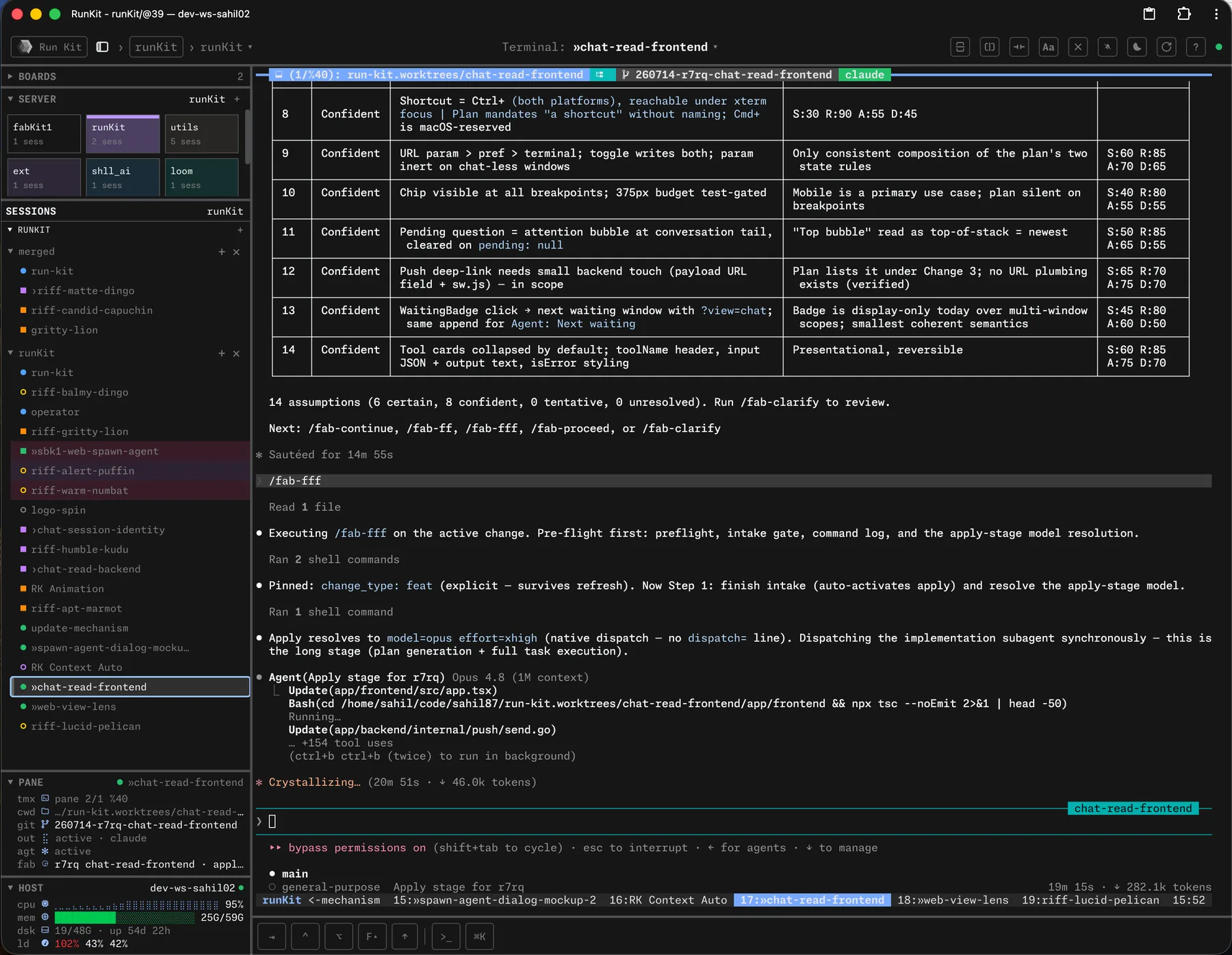


## The mental model
HexoKit is two independent halves that compose:
```
rk riff rk serve
▼ ▼
spawns agent runs the
workspaces ─────► browser dashboard
(tmux + worktree) (watches tmux)
```
You can run either alone. Run `rk riff` in any tmux session without ever starting `rk serve` — you get the spawning behavior, no dashboard. Run `rk serve` and never call `rk riff` — you get a tmux browser dashboard for sessions you spawn manually. The two are designed to compose, not depend on each other.
## `rk riff` — the spawner
One invocation gives you a git worktree, a tmux window inside it, and one or more panes ready to go. The default pane runs your coding agent, but a pane can run anything — `rk riff` is a workspace launcher, not an agent launcher.
- **Pane array**: `--skill` and `--cmd` are repeatable; each occurrence adds one pane, in argv order.
- **Layouts**: `--layout` picks `auto` (default), `tiled`, `even-*`, or `main-*`.
- **Presets**: built-ins `discuss`, `incognito`, `blank` ship in the binary; add or override skills under `riff_presets` in `~/.config/hexokit/config.yaml`; invoke as `rk riff `.
- **Parallel**: `-N ` spawns N workspaces; failures roll back before exiting.
- **wt passthrough**: flags after `--` go to `wt create` verbatim (e.g. `--base`, `--name`).
```bash
rk riff --skill /fab-fff --cmd "just dev" # 2 panes (agent + dev server)
rk riff discuss -N 3 # 3 parallel 'discuss' preset workspaces
```
**Prerequisites:** must be inside a tmux session and a git repository (or pass `--repo `), with [`wt`](https://github.com/sahil87/wt) and the launcher (default `claude --dangerously-skip-permissions`) on `PATH`. In a fab-kit project, the launcher is resolved per-project through `fab agent` (the `providers` / `agent` tables in `fab/project/config.yaml`) — point it at any agent CLI, or any command at all.
See the [riff guide](docs/site/workflows.md) for the full reference.
## `rk serve` — the HTTP server
Start the HTTP server in the foreground. Configurable via `RK_HOST` (default `127.0.0.1`) and `RK_PORT` (default `6123`). The port also has a durable home: set `port: 4000` in `~/.config/hexokit/config.yaml` and run `rk daemon restart` — `RK_PORT` still wins when set (precedence: default 6123 < config.yaml < `RK_PORT`).
```bash
rk serve # foreground on 127.0.0.1:6123
RK_HOST=0.0.0.0 RK_PORT=8080 rk serve # bind all interfaces, port 8080
```
To run it in the background, use the `rk daemon` subcommands (`start`, `restart`, `stop`, `status`). The daemon runs in its own dedicated tmux server (`rk-daemon`), completely separate from your sessions; restarts are idempotent kill-and-restart with no polling loop or signal files. Restart the daemon and everything you're running keeps running — the console reconnects automatically.
The daemon also manages a **code-server** beside it, powering the dashboard's `code` lens — a full editor at the window's git root, served same-origin behind `/code/`. It installs itself on first daemon start (or `rk code-server install`); a code-server you installed yourself is respected and never touched. Details in the [install & access guide](docs/site/install.md#code-server-the-code-lens).
## Status dots — read every window at a glance
Each window in the sidebar, dashboard, and pane panel carries a single **status dot** that tells the window's **local story** — which journey runs in the pane, whether anyone is working right now, and whether the pipeline failed here — using two orthogonal channels plus three additive overlays, and a right-edge **PR glyph** for the remote story:
- **Hue = journey**:  fab **building** (intake/apply/review) →  fab **PR-ready / done** (ship/review-pr/done) ·  an ad-hoc agent. A plain window is gray — color is reserved for a journey.
- **Shape = liveness**, the same meaning in every hue: **solid** = work happening now (agent mid-turn; floor: output flowing) · **ring** = at rest (no live worker, idle or waiting agent, parked done, quiet shell).
- **Overlays = additive flags**: a small **red center** flags a failed review/review-pr — inside the ring at rest, or as a **bullseye** (dark gap ring) over a solid while a rework agent is live; a **yellow halo** means an agent is waiting on you; a neutral **underbar** beneath the dot (sidebar row only) means the window is on the fab operator's watchlist.
- **PR glyph** (right edge): the branch's PR on GitHub — green open · yellow checks running · red failing · purple merged · gray draft. The dot never renders PR state.
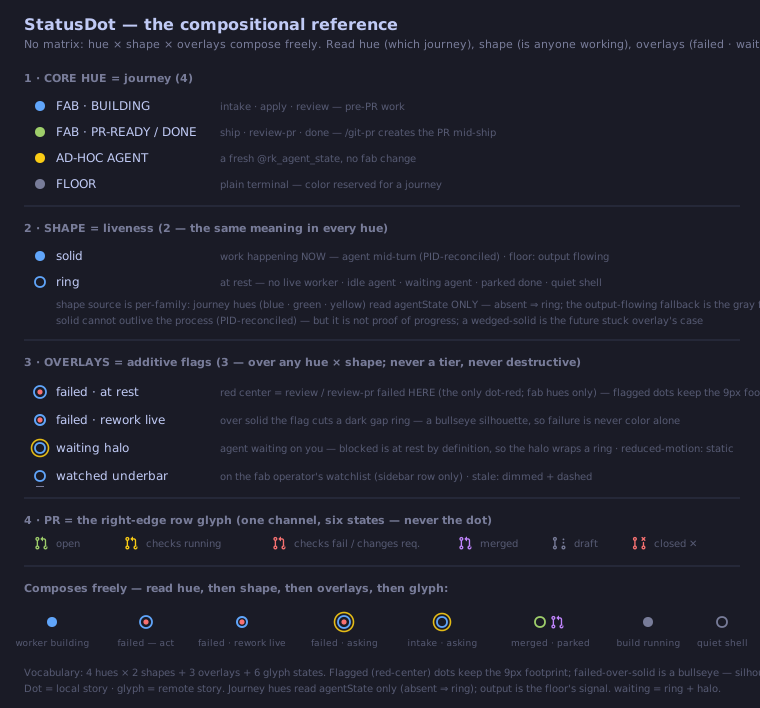
See the [status dot reference](docs/site/status-dot.md) for the full legend, the per-state rendering, and the design rationale.
## Agent state
Windows running an AI agent can report a live lifecycle state in the sidebar and pane panel: **active** (turn in progress), **waiting** (blocked on you — a permission prompt or question), or **idle** (turn done, with elapsed duration). `waiting` is the state worth a glance at your phone: the agent isn't working, it's waiting for *you*.
This is opt-in and needs a one-time setup per machine — the toolkit-wide wiring covers it (and runs automatically at the end of a toolkit install):
```bash
shll setup agent # places the shll toolkit skill + installs HexoKit's dashboard hooks
```
It delegates the hook install to `rk agent setup`, which shows the settings diff and asks before writing; `rk agent setup --uninstall` removes exactly the HexoKit-owned entries.
The setup installs agent-harness hooks into your user-global agent configs — Claude Code, Codex, Gemini CLI, GitHub Copilot CLI, Kimi Code, OpenCode, and Antigravity CLI, each wired when its binary is on `PATH` — that stamp a `@rk_pane_agent_state` tmux pane option on lifecycle events. Each hook is a thin wrapper delegating to `rk agent hook`, so hook fixes ship in the binary and track `rk update` — no settings changes, no session restarts. Hooks work for any session, in any repo, under any workflow; re-running the setup is idempotent and never touches your other hooks. Until it's run (and agent sessions are restarted), agent state shows `—`. Codex additionally needs its native trust review: open `codex` and trust the HexoKit entries via `/hooks`.
The per-harness capability matrix (verified versions, event mappings, transcript support, honest gaps) lives in the [agent hook integrations guide](docs/site/agent-hooks.md); the cross-repo convention is documented in [`docs/specs/agent-state.md`](https://github.com/sahil87/hexokit/blob/main/docs/specs/agent-state.md); upgrading from an older hook generation is covered in the [install & access guide](docs/site/install.md#upgrade).
## The operator — one agent to run the server
`rk operator` opens the **operator** — a per-tmux-server singleton window running the fab-kit operator-tier agent, role-marked so the dashboard pins it. Where `rk riff` spawns workers, the operator is the coordinator you talk to: it watches the fleet, dispatches and unblocks changes, and escalates to your phone when something needs you. Requires fab-kit on `PATH`; re-running switches to the existing tab. Hand it a templated work item from the shell with `rk operator request ` (`--list` prints the registry; a busy operator queues the request and it drains when idle).
## Boards — watch many panes at once
A **board** is a named, cross-server pane dashboard: pin any tmux window from any server into it, and the board renders all pinned panes side-by-side — perfect for watching three parallel agent sessions next to the `just dev` server they're editing. Pin from the sidebar's pin icon or the `Cmd+K` palette; pin state lives in tmux, so the same board URL shows the same panes on your phone. See the [boards guide](docs/site/boards.md) for pinning, keyboard cycling, resizing, and mobile behavior.
## GUI — the host's desktop in a tile
The GUI surface runs the host's desktop as a fourth tile beside `tty`/`code`/`web`, off by default and shared by every viewer and every agent. `rk gui on` starts a private X display with a window manager and reveals the 4th tile button (⌘4). IceWM is the default desktop; pick another (LXQt, XFCE, Plasma, LXDE, MATE, Cinnamon) from Settings → `gui.wm` or with `rk gui wm ` — `rk gui wm --list` shows what's installed and what each missing one takes to install. See the [GUI guide](docs/site/gui.md) for desktops, resolution, phone controls, and troubleshooting.
## Drive it from your phone (HTTPS over Tailscale)
Some browser features (clipboard, secure context) require HTTPS. Accessing HexoKit from another machine on your tailnet also requires HTTPS:
1. Enable HTTPS at [DNS > HTTPS Certificates](https://login.tailscale.com/admin/dns).
2. Run `sudo tailscale set --operator=$USER` (one-time — lets `tailscale serve` run without sudo).
3. Run `tailscale serve --bg http://localhost:6123`.
4. Open `https://..ts.net` on your phone or another laptop.
For a stable custom hostname or public access via Funnel, see the [Tailscale guide](docs/site/install.md#tailscale-https).
## Desktop app
A native desktop shell — an Electron window that wraps your dashboard and frees the browser-reserved `⌘` keyboard tier. Install and update it with the CLI (macOS and Linux):
```sh
rk desktop install # fetch the latest release and install it
rk desktop update # same, but a no-op when already current
rk desktop status # installed vs latest version (read-only)
```
The CLI path matters: on macOS it produces a quarantine-free, digest-verified install that opens cleanly — a browser-downloaded DMG gets blocked by Gatekeeper on every install and update. On Linux it downloads the AppImage, verifies the release digest, extracts it into `~/.local/state/hexokit/desktop`, and writes a launcher entry plus a `hexokit-desktop` symlink in `~/.local/bin` (`rk desktop uninstall` removes it). Updates ship through `rk desktop update` or the app's **Restart to Update** menu item — the app never updates itself.
The app's welcome page connects three ways: **This Mac / This Machine** (one-click daemon start), **over SSH** (bootstraps HexoKit on the remote box via `rk remote`), or **a URL**. It never starts, stops, or updates anything on its own, and your tmux sessions survive every daemon action. Details and the manual fallback are in the [install & access guide](docs/site/install.md#desktop-app).
## Push notifications
Any process on the box can push a real OS-level notification to your phone or desktop — even when the dashboard tab is **closed** — via Web Push:
```sh
rk notify "deploy finished" --title "CI"
```
It's **fail-silent**: if the server is unreachable it exits 0 and prints nothing, so it never stalls a calling script or agent loop. Opt in from the browser via the **bell icon** in the top bar or `Cmd+K` → **Notifications: Enable push** (requires HTTPS or `localhost`). See the [notifications guide](docs/site/notifications.md) for setup and troubleshooting.
## Shell completion
`shll setup shell` wires tab-completion for every installed shll tool — including `hexokit` and the `rk` alias — into your rc file (zsh, bash), and runs automatically at the end of a toolkit install. Re-running is a no-op when the block is already present.
Prefer wiring just this tool by hand? `rk shell-init ` emits the eval-safe block on its own:
```sh
eval "$(rk shell-init zsh)" # in ~/.zshrc — also: bash, fish, powershell
```
## Command reference
| Command | What it does |
|---------|--------------|
| `rk riff` | Create a worktree + tmux window + agent/command pane(s). |
| `rk tutorial` | Open the guided tour — an agent-run `tutorial` tab in this session. |
| `rk operator` | Open the operator — the server-wide orchestrator agent tab (singleton); `request ` hands it a templated work item. |
| `rk serve` | Start the HTTP server (foreground). |
| `rk daemon` | Manage the background daemon (`start`, `restart`, `stop`, `status`). |
| `rk status` | Show a tmux session summary. |
| `rk url` | Print the HexoKit server URL (config-derived; a heuristic for agents, not a liveness probe). `--mcp` prints the `/mcp` MCP endpoint. |
| `rk ports` | Print the port policy — reserved blocks, daemon default, effective port, and collision warnings (not a listing of listening ports). |
| `rk skill` | Print the agent skill bundle — a static usage briefing for agents operating HexoKit. |
| `rk mcp` | MCP server over stdio — an allowlisted proxy over rk verbs for chat clients with no shell on the box (Claude Desktop connector command: `ssh rk mcp`). |
| `rk notify` | Send a Web Push notification to your subscribed devices. Fail-silent. |
| `rk present` | Show a file, directory, `:port`, or URL to the user as a web tile on the current window. |
| `rk cron` | Scheduled agent prompts (`add`, `edit`, `list`, `rm`, `mute`, `pin`, `tick`). |
| `rk gui` | The host's desktop as a tile — `on`/`off`/`status`, `wm` (pick a desktop; `--list` shows installed and installable ones), `resize`, and the agent verbs (`exec`, `shot`, `key`). |
| `rk doctor` | Check runtime dependencies. Run this first when something breaks. |
| `rk agent` | Agent instrumentation — `setup` installs the state hooks + tmux guard shim, usually via `shll setup agent` (see [Agent state](#agent-state)). |
| `rk code` | Run VS Code palette commands in the open `code` lens editor from the shell. |
| `rk code-server` | Manage the rk-owned code-server install (`install`, `update`). |
| `rk mux` | Tmux substrate operations — server create/adopt/reap, messaging, pane capture, config scaffold, tmux guard. |
| `rk tab` | Drive a tab's UI state — layout, web tabs, code root, sidebar signals (`color`/`mark`/`note`/`flair`/`owner`) — from the shell. |
| `rk board` | List boards and pin/unpin/reorder windows on the cross-server board dashboards (`show`/`pin`/`unpin`/`reorder`). Needs `rk serve` up. |
| `rk role` | Mark or unmark the current window as the server's operator. |
| `rk update` | Upgrade via Homebrew and restart the daemon. |
| `rk desktop` | Install/update the desktop app on macOS and Linux (`install`, `update`, `status`, `uninstall`). |
| `rk remote` | Use SSH-only machines as HexoKit hosts (`add`, `connect`, `list`, `status`, `disconnect`, `remove`). |
| `rk completion` | Generate shell completion scripts (or use `rk shell-init` for eval-safe output). |
Run `rk --help` for full flag details, or see the [full command reference](https://hexokit.com/docs/commands/) for every command and flag.
## Troubleshooting
- **`rk riff` fails with "not in a tmux session"** — riff requires `$TMUX` to be set. Start tmux first (`tmux new -s work`), then run `rk riff` inside it.
- **`rk riff` fails with "wt not found"** — install `wt` via `shll install wt`, or install the full toolkit from [https://shll.ai](https://shll.ai).
- **`rk riff` fails with "not inside a git repository"** — riff creates a worktree, so it needs a repo. `cd` into one, or pass `--repo ` naming the repo's top-level directory.
- **Agent state shows `—` for every window** — run `shll setup agent` once on the machine, then start a fresh agent session (hooks apply to new sessions, not already-running ones). A pane sitting at a plain shell also reads `—` by design.
- **Daemon misbehaving and a plain restart doesn't help** — `rk daemon restart --full` kills the entire rk-daemon tmux server (including the `rk-jobs`, `rk-code-server`, and `rk-remotes` sibling sessions) so the start births a genuinely fresh server, then reconnects any remote tunnels that were up. It refuses to run from a pane inside the rk-daemon server itself, where the kill would take down the invoking pane mid-restart.
- **Anything else broken** — run `rk doctor`. It checks tmux, `wt`, the launcher binary, port availability, and prints per-dependency status.
### Commands
hexokit — hexokit — tmux session manager with web UI
hexokit agent — Agent instrumentation (state hooks setup and reporting)
hexokit agent hook — Report an agent's lifecycle state to run-kit (invoked by installed hooks)
hexokit agent setup — Install agent-harness hooks that report agent state to run-kit
hexokit board — List boards and pin/unpin/reorder windows on them (needs rk serve up)
hexokit board pin — Pin a window to a board
hexokit board reorder — Move a pinned window within a board
hexokit board show — List boards, or one board's pinned windows
hexokit board unpin — Remove a window from a board
hexokit code — Run VS Code commands in the code lens editor from the shell
hexokit code commands — List the command ids a code-bridge host can execute
hexokit code exec — Execute a VS Code command in a code-bridge host
hexokit code hosts — List live code-bridge hosts
hexokit code-server — Manage the rk-owned code-server install (the /code lens editor)
hexokit code-server install — Download the latest code-server release and activate it
hexokit code-server restart — Kill and respawn the daemon-managed code-server session
hexokit code-server start — Start the daemon-managed code-server session now
hexokit code-server update — Update the managed code-server to the latest release
hexokit cron — Scheduled agent prompts (add, edit, list, rm, mute, pin, tick)
hexokit cron add — Add a cron entry to the server's intent file
hexokit cron edit — Edit a cron entry's schedule or policies in place
hexokit cron list — List the server's cron entries (disk-derived; no tmux probes)
hexokit cron mute — Mute a cron entry (skip its fires) — --for leases the mute, --off unmutes
hexokit cron pin — Pin a cron entry (exempt from orphan expiry) — --off unpins
hexokit cron rm — Remove a cron entry by id
hexokit cron tick — Run one cron evaluation sweep across every live server
hexokit daemon — Manage the background run-kit daemon (tmux-managed run-kit serve)
hexokit daemon restart — Restart the run-kit daemon
hexokit daemon run — Run a command in a managed job window on the daemon's tmux server
hexokit daemon start — Start the run-kit daemon
hexokit daemon status — Show run-kit daemon state and current port owner
hexokit daemon stop — Stop the run-kit daemon
hexokit desktop — Install and update the HexoKit desktop app (macOS, Linux)
hexokit desktop install — Download and install the HexoKit desktop app
hexokit desktop status — Show installed vs latest HexoKit desktop app version (read-only)
hexokit desktop uninstall — Remove the HexoKit desktop app and its desktop integration (Linux)
hexokit desktop update — Update the HexoKit desktop app when a newer release exists
hexokit doctor — Check runtime dependencies
hexokit gui — Manage the host GUI surface (the rk-gui desktop session)
hexokit gui click — Click at display-pixel coordinates
hexokit gui clip — Read or write the GUI display's clipboard
hexokit gui env — Print DISPLAY/RK_GUI_SOCKET exports for eval
hexokit gui exec — Run a command on the GUI display (DISPLAY set)
hexokit gui focus — Raise and focus a window on the GUI display
hexokit gui key — Press key chords (xdotool keysym spelling)
hexokit gui launch — Open a terminal or browser on the GUI display
hexokit gui lock — Pin the display resolution against viewer resizes
hexokit gui move — Move the pointer to display-pixel coordinates
hexokit gui off — Turn the GUI off and kill the rk-gui session
hexokit gui on — Turn the GUI on and start the rk-gui session
hexokit gui open — Open a URL or file on the GUI display
hexokit gui resize — Resize the GUI desktop (gui.geometry)
hexokit gui restart — Kill and respawn the rk-gui session
hexokit gui scroll — Scroll at the pointer (or at --at x y first)
hexokit gui shot — Screenshot the GUI display to a PNG and print its path
hexokit gui status — Show the GUI state
hexokit gui type — Type text into the focused window (unicode-safe)
hexokit gui unlock — Clear the host display-resolution pin
hexokit gui wait — Wait for a window to appear or the screen to go quiet
hexokit gui windows — List the visible windows on the GUI display
hexokit gui wm — Show or pin the window manager (gui.wm)
hexokit mcp — Serve run-kit's MCP tools over stdio (connector command: ssh rk mcp)
hexokit mux — Tmux substrate operations (server create, messaging, pane capture/kill/process, pane/session enumeration, janitor, recovery, config scaffold, tmux guard)
hexokit mux adopt — Adopt an external tmux server into run-kit management
hexokit mux await — Block until an agent pane reaches a state (or a file appears)
hexokit mux capture — Capture a pane's scrollback with substrate context
hexokit mux guard — Front the real tmux binary, blocking bare kill-server
hexokit mux init-conf — Scaffold the rk-managed tmux.conf and tmux.d/ overrides under ~/.config/hexokit/
hexokit mux inventory — Read a live session and pane inventory across tmux servers
hexokit mux kill — Kill a pane, gated on its agent state and server protection
hexokit mux new — Create a detached tmux server on socket
hexokit mux panes — Enumerate every pane on the server with substrate facts
hexokit mux process — Show the process tree running in a pane
hexokit mux reap — Reap leaked test tmux servers and stale sockets by prefix
hexokit mux send — Deliver a message into an agent's pane, gated on its agent state
hexokit mux sessions — Enumerate the server's sessions with derived roles
hexokit mux snapshot — Inspect and restore tmux server layout snapshots
hexokit mux snapshot list — List available layout snapshots (live + died)
hexokit mux snapshot restore — Recreate a dead server's layout from its snapshot
hexokit mux snapshot show — Print a stored layout (sessions → windows → pane cwds) without acting
hexokit notify — Send a Web Push notification to subscribed devices
hexokit operator — Open the operator — the server-wide orchestrator agent tab (singleton)
hexokit operator request — Hand the server's operator agent a templated work item
hexokit ports — Print the run-kit port policy (reserved blocks, defaults, collisions)
hexokit present — Show a file, directory, port, or URL to the user as a web tile
hexokit remote — Use SSH-only machines as run-kit hosts (bootstrap, tunnel, connect)
hexokit remote add — Register a remote and assign its stable local port
hexokit remote connect — Bootstrap if needed, start the remote daemon, open the tunnel
hexokit remote disconnect — Close the tunnel window (the remote daemon keeps running)
hexokit remote list — All remotes with derived tunnel + remote daemon state
hexokit remote remove — Disconnect and drop the registration (remote install untouched)
hexokit remote status — Single-remote detail, including version skew
hexokit riff — Create a worktree, tmux window, and Claude Code session
hexokit role — Mark or unmark the current window as the server's operator
hexokit serve — Start the HTTP server (foreground)
hexokit skill — Print run-kit's agent skill bundle (static usage briefing)
hexokit status — Show tmux session summary
hexokit tab — Drive a tab's UI state — layout, web tabs, code root, signals — from the shell
hexokit tab code — Set the code surface's folder
hexokit tab code set — Point the tab's code surface at a folder
hexokit tab color — Set or clear the tab's color
hexokit tab flair — Set or clear the tab's per-row flair
hexokit tab layout — Read or mutate a tab's surface layout
hexokit tab mark — Set or clear the tab's left-gutter marker
hexokit tab new — Create a window, optionally born with a layout and/or running a command
hexokit tab note — Set or clear the tab's one-line status note
hexokit tab owner — Set or clear the tab's operator-ownership trail
hexokit tab show — Dump every @rk_win_* option of a tab
hexokit tab web — Add, remove, move, select, or list a tab's web tabs
hexokit tab web add — Attach a file, directory, port, or URL to a tab's web-tab strip
hexokit tab web ls — List a tab's web tabs
hexokit tab web mv — Move a web tab to a new slot position
hexokit tab web rm — Remove a web tab from a tab's strip
hexokit tab web select — Select the active web tab of a tab's strip
hexokit tutorial — Open the guided tour — an agent-run tutorial tab in this session
hexokit update — Update the run-kit CLI and desktop app to the latest version
hexokit url — Print the run-kit server URL (env → tmux option → default)
## fab-kit
A development toolkit for AI-assisted coding. It includes a 6-stage pipeline (intake → apply → review → hydrate → ship → review-PR), standalone CLI tools for [git worktree management](https://github.com/sahil87/fab-kit/blob/main/docs/specs/companions.md) (`wt`) and [idea backlogs](https://github.com/sahil87/fab-kit/blob/main/docs/specs/companions.md) (`idea`), and batch orchestration for running multiple AI agents in parallel. Plain markdown prompts, no SDK, no vendor lock-in. Works with Claude Code, Codex, Cursor, and Windsurf.
AI agents write code fast. The bottleneck is now your clarity: did you define the problem well enough? Fab Kit sits at that bottleneck — it forces structured thinking before implementation, grounds every session in your project's actual context, and gets cheaper to run as agents improve.
> **[Try it now](#quick-start)** | **[Understand the concepts](#why-fab-kit)** | **[Install guide](docs/site/install.md)** | **[Workflows guide](docs/site/workflows.md)** | **[Glossary](https://github.com/sahil87/fab-kit/blob/main/docs/specs/glossary.md)** (new to Fab terminology?)
**Contents:** [The 6 Stages](#the-6-stages) · [Prerequisites](#prerequisites) · [Quick Start](#quick-start) · [Why Fab Kit](#why-fab-kit) · [The 5 Cs](#the-5-cs-of-quality) · [Commands](#command-quick-reference)
## Install
```sh
curl -fsSL https://shll.ai/install | sh
```
Installs the entire shll toolkit via Homebrew, handling tap trust automatically. fab-kit relies on its sibling tools (`wt` for worktrees, `idea` for the backlog), so the full-toolkit install is the supported path.
## The 6 Stages
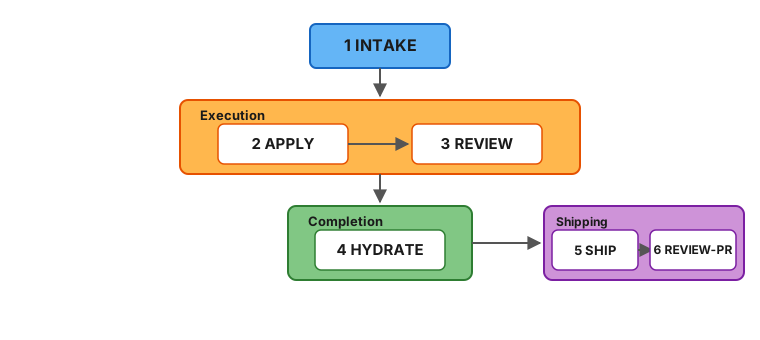
Every change (a self-contained feature or fix with its own folder) moves through six stages:
Mermaid source
| # | Stage | Purpose | Artifact |
|---|-------|---------|----------|
| 1 | **Intake** | Capture intent, scope, approach | `intake.md` |
| 2 | **Apply** | Co-generate `plan.md` (requirements + tasks + acceptance) from intake, then execute the tasks | `plan.md` + code changes |
| 3 | **Review** | Sub-agent validates against the plan's requirements and [constitution](#code-quality-as-a-guardrail) (your project's architectural rules) | Prioritized findings report |
| 4 | **Hydrate** | Save learnings into project memory (`docs/memory/`) | Memory updates |
| 5 | **Ship** | Commit, push, and create a GitHub PR | Pull request |
| 6 | **Review-PR** | Triage and fix PR review comments from humans or automated reviewers | Comments addressed |
Each stage produces a persistent artifact or state update. Interrupt anything — re-run the same command to resume. All pipeline skills are idempotent.
Review is performed by a **sub-agent** running in a separate context - a fresh perspective that validates against both the plan's requirements and your [project constitution](#code-quality-as-a-guardrail). Findings are prioritized (must-fix, should-fix, nice-to-have) and the agent triages them, looping back for automatic rework on the issues that matter most.
A change folder looks like this:
```
fab/changes/260101-abcd-add-spinner/
├── intake.md # What you want and why
├── plan.md # Requirements + tasks + acceptance (generated at apply entry)
└── .status.yaml # Pipeline state (symlinked as .fab-status.yaml at repo root while this change is active)
```
## Prerequisites
> 📦 For the full, tool-specific install walkthrough — companion utilities, shell completion, and the new-project / existing-repo / upgrade flows — see the **[Install guide](docs/site/install.md)**.
### Using Fab Kit
See [Install](#install) above. You'll also need a few utilities fab depends on:
```bash
brew install yq jq gh direnv
```
* After installing `gh`, authenticate with `gh auth login`.
* After installing `direnv`, add the hook [to your shell](https://direnv.net/docs/hook.html).
* Optional — activate shell completion in your shell's rc file:
```bash
eval "$(fab shell-init zsh)" # or bash / fish
```
Works from any directory (no fab project required). Prefer saving the script to disk? Use `fab completion ` instead.
| Tool | Purpose |
|------|---------|
| [fab-kit](https://github.com/sahil87/fab-kit) | The `fab` CLI router and workspace lifecycle (`init`/`upgrade-repo`/`sync`) |
| [wt](https://github.com/sahil87/wt), [idea](https://github.com/sahil87/idea) | Recommended companions (`shll install wt idea` — see [shll.ai](https://shll.ai)) — worktree isolation and the idea backlog; see [Companion tools](#companion-tools) |
| [yq](https://github.com/mikefarah/yq) | YAML processing for status files and schemas |
| [jq](https://jqlang.github.io/jq/) | JSON processing for settings merge during sync |
| [gh](https://cli.github.com/) | GitHub CLI - used for releases and PR workflows |
| [direnv](https://direnv.net/) | Auto-loads `.envrc` to set workspace environment variables |
### Developing Fab Kit
In addition to the above:
```bash
brew install go just
```
| Tool | Purpose |
|------|---------|
| [Go](https://go.dev/) | Required for building binaries from source (`src/go/`) |
| [just](https://just.systems/) | Task runner for build, test, and release recipes |
## Quick Start
### 1. Install
#### New project
```bash
fab init
```
This downloads the latest release to the system cache, sets `fab_version` in `fab/project/config.yaml`, and runs `fab sync` to deploy skills — all in one step. No curl scripts or manual downloads.
**Then in your AI agent:**
```
/fab-setup # Claude Code
$fab-setup # Codex
```
This generates `fab/project/constitution.md` and other project configuration files. Run `fab doctor` to verify your setup.
Once setup completes, run `/fab-discuss` to load project context and orient before your first change (or `/fab-incognito` to rethink the fab process itself without loading project memory).
#### Onboarding an existing repo with prior docs
If your project already has documentation (Notion pages, Linear specs, READMEs, design docs), bootstrap memory from them before your first change:
1. **Initialize the repo:**
```bash
fab init # new to Fab Kit
fab sync # cloning a repo that already uses Fab Kit
```
2. **In your AI agent — set up project config:**
```
/fab-setup
```
3. **Hydrate memory from your existing docs** (or from the codebase itself):
```
/docs-hydrate-memory ./README.md ./docs/
/docs-hydrate-memory # no args → generate from codebase analysis
```
Accepts Notion/Linear URLs, local `.md` files, or folder paths. Safe to re-run — content is merged, not overwritten.
4. **Propagate memory into structured specs:**
```
/docs-hydrate-specs
```
This flows memory → specs (the reverse of `hydrate`), surfacing gaps where memory covers a topic that specs don't. Top gaps are previewed for confirmation.
5. **Orient before your first change:**
```
/fab-discuss
```
#### Updating from a previous version
Two steps — one in the terminal, one in your AI agent:
1. **In your terminal** — bump the kit version and re-sync:
```bash
fab upgrade-repo # upgrades to latest version
fab upgrade-repo 0.44.0 # upgrades to a specific version
```
`fab upgrade-repo` tells you whether step 2 is needed. If a data migration is pending, the output ends with a highlighted line — `Run '/fab-setup migrations' to update project files` — and **that** step runs in your AI agent, not the terminal. No highlighted line means you're already up to date: skip step 2.
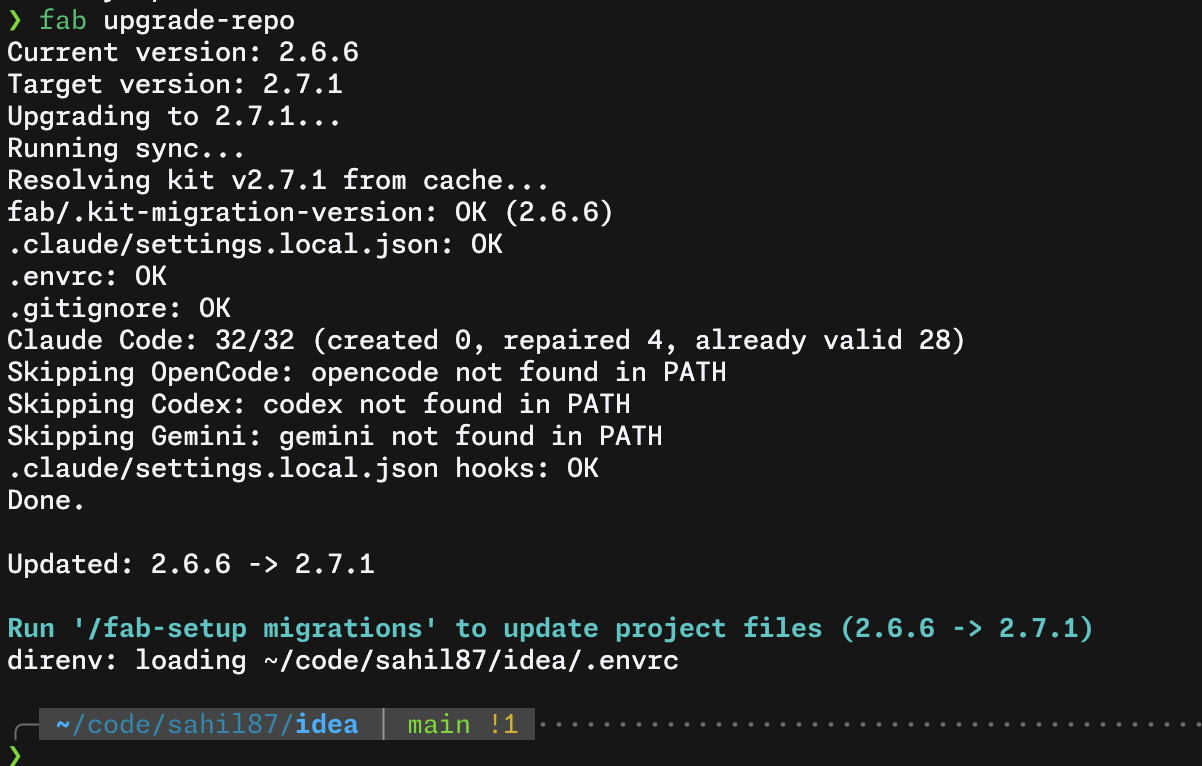
2. **In your AI agent** (only if step 1 flagged a migration) — apply it:
```
/fab-setup migrations # Claude Code
$fab-setup migrations # Codex
```
Safe to re-run — no-op if no migrations are pending.
To re-deploy skills, scaffold structure, and sync hooks without changing the pinned version (useful after cloning):
```bash
fab sync
```
> **Note:** `fab sync` runs automatically in every new worktree created by [`wt create`](https://github.com/sahil87/fab-kit/blob/main/docs/specs/companions.md#wt--worktree-isolation).
### 2. Your first change
> 🛠️ For a task-oriented walkthrough of driving the pipeline — the per-stage command sequence, the apply⇄review auto-rework loop, `/fab-ff` vs `/fab-fff` vs `/fab-proceed`, and going parallel with worktrees — see the **[Workflows guide](docs/site/workflows.md)**.
Fab Kit skills are slash commands you type into an AI agent's chat, not the terminal. Open a session in your project directory:
- **Claude Code:** `claude` in terminal
- **Codex:** `codex` in terminal
- **Cursor / Windsurf:** open the project, use the chat panel
Then type the commands below in the agent's prompt. Each command runs one pipeline stage — the AI generates output in real time, so wait for it to finish before running the next.
```bash
# In your AI agent:
# Creation - creates change folder, writes intake.md, activates the change, creates git branch
/fab-new Add a loading spinner to the submit button
# Apply - generates plan.md (requirements + tasks + acceptance) and implements the code, checking off tasks as it goes
/fab-continue
# Review - reviews implementation against the plan's requirements + constitution
/fab-continue
# Hydrate - saves learnings into docs/memory/
/fab-continue
# Ship - commit, push, and create a GitHub PR
/git-pr
# Review-PR - triage and fix PR review comments
/git-pr-review
# Archive - move the change folder out of active changes
/fab-archive
```
At any point, run `/fab-status` to see where you are.
For small changes, `/fab-ff` (fast-forward) runs the pipeline through hydrate in one shot - gated by a single intake [confidence score](#structured-autonomy-not-guesswork) that ensures ambiguity is low enough for safe execution. Both `/fab-ff` and `/fab-fff` (full fast-forward) auto-loop between apply and sub-agent review, fixing issues automatically before escalating to you.
### 3. Going parallel
While AI works on one change, start another in a separate [git worktree](https://git-scm.com/docs/git-worktree) (an isolated copy of your repo):
```bash
# In your terminal:
wt create # creates an isolated worktree with a random name
# In a new AI agent session in that worktree:
/fab-new Add error toast for failed submissions
```
Each change is a self-contained folder - multiple AI sessions run in parallel without conflicts. `/fab-new` auto-activates, so you can start working immediately. Use `/fab-draft` to queue a change without switching to it. [How the assembly line works →](https://github.com/sahil87/fab-kit/blob/main/docs/specs/assembly-line.md)
### Troubleshooting
Run `fab doctor` to check all prerequisites (git, yq, direnv hook, etc.) and diagnose common setup issues.
- `direnv allow` doesn't work - reload your shell or run `eval "$(direnv export zsh)"`
- `/fab-setup` not recognized - re-run `fab sync` to deploy skills
- **After cloning a repo that uses Fab Kit** - run `fab sync` once. Fab's deployed skill copies in `.agents/skills/` (always), `.claude/skills/` (when `claude` is available), and the other agent targets are ignored via a generated per-target `.gitignore`, so each developer needs to deploy them locally. The same sync also writes the machine-level `fab-operator` pointer skill (`~/.agents/skills/fab-operator/SKILL.md`, plus `~/.claude/skills/fab-operator/SKILL.md` when `claude` is available), so `/fab-operator` resolves from any directory.
- **A stage fails mid-way** - run `/fab-continue` to resume from the last checkpoint. All stage artifacts are persisted, so no progress is lost.
- **AI produces bad code** - the review sub-agent catches it. `/fab-ff` and `/fab-fff` auto-loop between apply and review (up to 3 cycles) before escalating to you.
- **Abandon a change** - delete the change folder, or run `/fab-archive` to move it to the archive.
- **You built something without Fab and opened a PR** - run `/fab-adopt` on the branch to bring it into the pipeline mid-flight. It reconstructs the intake and plan from the diff, runs review and hydrate (so `docs/memory/` stays the source of truth), and syncs the PR's `## Meta` block — only `apply` is marked skipped, since the code already exists.
## Why Fab Kit
AI coding tools give you speed but leave you to manage quality and knowledge yourself. Fab Kit gives you all four:
| [**Speed**](#parallel-by-default) | [**Knowledge**](#shared-memory-that-grows-with-your-project) | [**Quality**](#code-quality-as-a-guardrail) | [**Autonomy**](#structured-autonomy-not-guesswork) |
|:---:|:---:|:---:|:---:|
| Parallel changes - never idle | Compounds with every change | Constitution + self-correcting review | Confidence-scored - assumes or asks based on context |
### Parallel by Default
```
██ = working ░░ = idle
One at a time
─────────────
You ██░░░░░░░░██░░░░░░░░██░░░░░░░░██░░░░░░░░
AI ░░████████░░████████░░████████░░████████
Create, wait, review. Create, wait, review.
More waiting than working.
Assembly line
─────────────
You ██████░░█████████░██░█████████░██░░░░░░░
AI ░░░░░░██████████░████████████░░████████░
Create a batch, hand off, create the next batch.
Both always working.
```
Without Fab, you describe a task, wait while AI works, review, repeat. With Fab, you batch structured changes - each in its own folder and worktree - and create the next batch while AI executes the current one.
Three properties make this work:
- **Self-contained change folders** - Each change has its own intake, plan, and status. No shared state - parallel changes don't interfere during development.
- **Git worktree isolation** - Each change runs in its own [worktree](https://git-scm.com/docs/git-worktree). Parallel AI sessions can't step on each other.
- **Resumable pipeline** - Every stage produces a persistent artifact. Interrupt anything, resume later.
### Shared Memory That Grows With Your Project
Most AI tools give each session a private memory that disappears when the session ends. Fab saves learnings from every completed change into `docs/memory/` - a domain-organized knowledge base committed to git and shared with the entire team.
```
┌──────────┐ hydrate ┌──────────────┐
│ plan.md │ ─────────────▶ │ docs/memory/ │
└──────────┘ └──────┬───────┘
▲ │
│ context for next │
└──────── change ─────────────┘
```
This creates a self-reinforcing cycle:
- **Every change makes the next one better** - Design decisions from `plan.md` merge into memory. Future changes load those files as context, so AI starts with real knowledge of your system instead of guessing.
- **Team knowledge, not personal notes** - Memory lives in git. Every developer and every AI session reads the same source of truth. Onboarding means cloning the repo.
- **Bootstrap from existing docs** - `/docs-hydrate-memory` ingests documentation from Notion, Linear, or local files. The pipeline keeps it current from there.
- **Structured, not append-only** - Memory is organized by domain (`auth/`, `payments/`, `users/`). `/docs-reorg-memory` restructures as it grows. `/docs-hydrate-specs` updates spec files with relevant details from memory.
### Code Quality as a Guardrail
AI writes code fast. Without structure, it also skips requirements, ignores architectural conventions, and ships the first thing that works. Fab enforces quality through structure, a constitution, and self-correcting review.
```
┌───────────────────────────────┐
│ fab/project/constitution.md │
│ MUST · SHOULD · MUST NOT │
└───────────────┬───────────────┘
│
intake → apply ⇄ review → hydrate
↑ ↗
└───────┘
sub-agent review
with prioritized
findings
```
- **Stages that can't be skipped** - The pipeline requires intake before any code is written. The AI can't jump straight to implementation. Before code is written, the [SRAD framework](#structured-autonomy-not-guesswork) ensures planning decisions are grounded in context - not silently guessed.
- **Project constitution** - `fab/project/constitution.md` defines your architectural rules using MUST/SHOULD/MUST NOT. Every plan and review checks against it - not just the change's requirements.
- **Review that fixes, not just flags** - A **sub-agent** reviews in a fresh context, returning prioritized findings. The applying agent triages by severity and loops back to the right stage:
| Review finds | Priority | Loops back to | What happens |
|-------------|----------|---------------|--------------|
| Requirement mismatch, failing tests | Must-fix | → apply | Unchecks failed tasks in `plan.md`, re-runs them |
| Missing/wrong tasks | Must-fix | → apply | Regenerates `plan.md`, re-applies |
| Requirements were wrong | Must-fix | → apply | Updates `plan.md`'s `## Requirements`, regenerates tasks |
| Code quality issue | Should-fix | → apply | Addressed when clear and low-effort |
| Style suggestion | Nice-to-have | - | May be skipped |
`/fab-fff` and `/fab-ff` auto-loop between apply and review (up to 3 cycles) - each re-review uses a fresh sub-agent. `/fab-ff` falls back to interactive rework after exhausting auto-retries. A typical `/fab-fff` run uses 2-4 agent turns per stage; the sub-agent review spawns a separate context.
#### The 5 Cs of Quality
Five configuration files shape how AI works in your project. Each answers a different question:
| C | File | Question |
|---|------|----------|
| **Constitution** | `fab/project/constitution.md` | What are our non-negotiable principles? |
| **Context** | `fab/project/context.md` | What are we working with? |
| **Code Quality** | `fab/project/code-quality.md` | How should code look when we write it? |
| **Code Review** | `fab/project/code-review.md` | What should we look for when we validate? |
| **Config** | `fab/project/config.yaml` | What are the project's factual settings? |
Notice the author-vs-critic split: `code-quality.md` guides the **writing** agent during apply - coding standards, anti-patterns, test strategy. `code-review.md` guides the **reviewing** sub-agent during review - severity definitions, scope boundaries, rework budget. Different cognitive modes, different concerns, different files.
All five are optional except `constitution.md` and `config.yaml`. They live in `fab/project/`. Run `/fab-setup` to generate them from scaffolds with sensible defaults. For the full `config.yaml` schema — every available option, documented — run `fab config explain`.
### Structured Autonomy, Not Guesswork
AI tools either ask too many questions or silently assume. Fab uses **SRAD** - a 4-dimension framework - to decide which to do for each decision point during planning.
**S**ignal strength · **R**eversibility · **A**gent competence · **D**isambiguation type
Each dimension scores how safe it is to assume. The scores aggregate into a confidence grade:
| Grade | What happens |
|-------|-------------|
| **Certain** | Proceeds silently - deterministic from config/codebase |
| **Confident** | Proceeds, noted in assumptions summary |
| **Tentative** | Proceeds with marker - resolvable via `/fab-clarify` |
| **Unresolved** | Blocks and asks - too ambiguous to guess |
Grades aggregate into a **confidence score** that gates `/fab-ff`. If ambiguity is too high, the pipeline refuses to run and tells you what to clarify - no silent guesswork, no unnecessary interruption. [How SRAD works →](https://github.com/sahil87/fab-kit/blob/main/docs/specs/srad.md)
## Command Quick Reference
> **Prefix:** Use `/fab-*` in Claude Code, `$fab-*` in Codex.
> 📖 The tables below are a quick reference. For the full, auto-generated command reference — every subcommand, flag, and usage string — see **[shll.ai/tools/fab-kit/commands](https://shll.ai/tools/fab-kit/commands/)**.
### Pipeline
| Command | Purpose |
|---------|---------|
| `/fab-new ` | Start a new change — creates the intake, activates it, and creates the git branch |
| `/fab-draft ` | Create a change intake without activating it (queue for later) |
| `/fab-continue` | Advance to the next stage (or reset to a specific stage) |
| `/fab-ff` | Fast-forward through hydrate — confidence-gated, auto-rework loop |
| `/fab-fff` | Fast-forward further through ship + PR review — same gates as ff |
| `/fab-clarify` | Refine the current artifact — resolve gaps without advancing |
| `/fab-adopt` | Adopt an off-pipeline change — reconstruct intake + plan from an open PR's branch diff, then run review, hydrate, and PR decoration retroactively |
| `/fab-archive` | Archive a completed change (or restore an archived one) |
| `/fab-proceed` | Context-aware orchestrator — detects state, runs setup steps, then delegates to `/fab-fff` |
### Setup & Status
| Command | Purpose |
|---------|---------|
| `/fab-setup` | Bootstrap fab/ structure, manage config/constitution, apply migrations |
| `/fab-status` | Show current change state — name, branch, stage, checklist, next command |
| `/fab-switch` | Switch active change (or list available changes) |
| `/fab-help` | Show workflow overview and command summary |
| `/fab-discuss` | Load project context for an exploratory discussion session |
| `/fab-incognito` | Load fab process knowledge for a redesign discussion — skips project memory and specs |
### Git
| Command | Purpose |
|---------|---------|
| `/git-branch` | Create or switch to the git branch matching the active change |
| `/git-pr` | Commit, push, and create a GitHub PR |
| `/git-pr-review` | Process PR review comments — triage and fix feedback |
### Documentation
| Command | Purpose |
|---------|---------|
| `/docs-hydrate-memory [sources...]` | Ingest external docs or generate memory from codebase analysis |
| `/docs-hydrate-specs` | Detect gaps between memory and specs, propose additions |
| `/docs-reorg-memory` | Analyze memory files for themes, suggest reorganization |
| `/docs-distill-memory []` | Rewrite a memory domain to the FKF present-truth style — strip narration, cap descriptions, relocate rationale |
| `/docs-reorg-specs` | Analyze spec files for themes, suggest reorganization |
| `/code-reorg []` | Review source-tree structure — placement, naming, consolidation — and present a ranked findings report (read-only, suggestions only) |
| `/code-dedupe [scope]` | Sweep a scoped area for duplicated utilities, cluster them by behavioral shape, and present a ranked consolidation report (read-only, suggestions only) |
### Multi-Agent Coordination
The operator (`/fab-operator`) is a long-running coordination layer that sits in its own tmux pane, observing and directing agents across other panes. It is optional and useful when running multiple agent sessions simultaneously.
| Command | Purpose |
|---------|---------|
| `/fab-operator` | Multi-agent coordination — monitoring, auto-answering, autopilot queues, dependency-aware spawning |
[Operator version history →](https://github.com/sahil87/fab-kit/blob/main/docs/specs/operator.md)
### CLI Subcommands
| Command | Purpose |
|---------|---------|
| `fab sync` | Repair symlinks, scaffold structure, deploy skills |
| `fab config show [key]` / `explain [key]` | Inspect effective values or the config schema |
| `fab config set` / `unset` | Surgically change one project or system override |
| `fab config init` / `upgrade` | Bootstrap or reconcile config files |
| `fab doctor` | Diagnose common setup issues |
| `fab fab-help` | Print workflow overview to terminal |
| `fab operator` | Launch operator in a dedicated tmux tab |
| `fab batch new` | Create worktree tabs from backlog items |
| `fab batch switch` | Open tmux tabs in worktrees for one or more changes |
| `fab batch archive` | Archive multiple completed changes in one session |
## Stage Coverage by Command
Which pipeline stages each command covers. Taller bars = more automation. Read left-to-right from most manual to most automated. **▶** marks typical entry points — start with `/fab-discuss` (exploratory; `/fab-incognito` for a process redesign) or `/fab-new` (ready to build). Arrows show the typical path from idea to PR. Dashed borders indicate optional/utility stages. Empty cells = not covered by that command.
| Color | Category | Commands |
|-------|----------|----------|
| 🟦 Cyan | Explore (read-only) | `/fab-discuss`, `/fab-incognito` |
| 🟧 Amber | Manual (single action) | `/fab-draft`, `/fab-switch`, `/fab-continue` |
| ⬜ Blue-grey (dashed) | Git utilities | `/git-branch`, `/git-pr`, `/git-pr-review` |
| 🟩 Green | Automated pipeline (multi-stage) | `/fab-new`, `/fab-ff`, `/fab-fff`, `/fab-proceed`, `/fab-adopt` |
| ◻️ Grey | Fab pipeline stage (row label) | intake, change active, apply, review, hydrate |
| ▶ | Typical entry point | `/fab-discuss`, `/fab-incognito`, `/fab-new` |
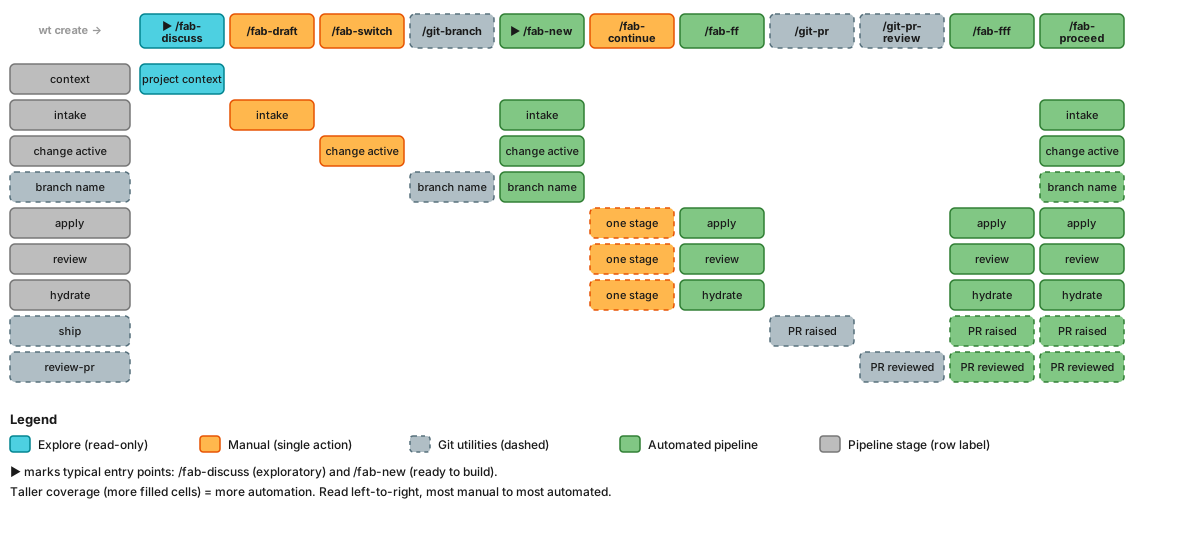
> `/fab-adopt` (rightmost column) enters the pipeline mid-flight on an existing branch/PR: it reconstructs intake from the diff and skips `apply` since the code already exists.
Mermaid source
**Quick reference** — which stages does each command cover? `/fab-incognito` covers the same `context` cell as `/fab-discuss` (kit process knowledge instead of project memory) and is omitted from the matrix.
| Stage | `/fab-discuss` | `/fab-draft` | `/fab-switch` | `/git-branch` | `/fab-new` | `/fab-continue` | `/fab-ff` | `/git-pr` | `/git-pr-review` | `/fab-fff` | `/fab-proceed` | `/fab-adopt` |
|-------|:-:|:-:|:-:|:-:|:-:|:-:|:-:|:-:|:-:|:-:|:-:|:-:|
| context | ✅ | | | | | | | | | | | |
| intake | | ✅ | | | ✅ | | | | | | ✅ | ✅ |
| change active | | | ✅ | | ✅ | | | | | | ✅ | ✅ |
| branch name | | | | ✅ | ✅ | | | | | | ✅ | |
| apply | | | | | | ✅ | ✅ | | | ✅ | ✅ | ⏭️ |
| review | | | | | | ✅ | ✅ | | | ✅ | ✅ | ✅ |
| hydrate | | | | | | ✅ | ✅ | | | ✅ | ✅ | ✅ |
| ship | | | | | | | | ✅ | | ✅ | ✅ | ✅ |
| review-pr | | | | | | | | | ✅ | ✅ | ✅ | ✅ |
`/fab-adopt` enters the pipeline mid-flight on an existing branch/PR: it reconstructs intake from the diff and runs review → hydrate → ship → review-pr, but marks `apply` **skipped** (⏭️) since the code already exists.
## Companion tools
**wt** and **idea** are independent projects with their own release cadences — install them via [shll.ai](https://shll.ai):
```sh
shll install wt idea
```
They are recommended, not required — fab degrades gracefully when they are absent. The worktree flows that need `wt` (`fab batch new`/`switch`, operator agent spawning) stop upfront with an install hint rather than failing mid-run; an absent `idea` costs nothing (`/fab-new` reads `fab/backlog.md` directly).
| Tool | Role in the fab workflow | Repo |
|------|--------------------------|------|
| **wt** | Worktree isolation — each change runs in its own worktree (the foundation of [parallel changes](#parallel-by-default)). Used by `fab batch new` and `fab batch switch`. | [sahil87/wt](https://github.com/sahil87/wt) |
| **idea** | Per-repo backlog (`fab/backlog.md`) that feeds `/fab-new`. `fab batch new` reads open ideas and creates a worktree per item. | [sahil87/idea](https://github.com/sahil87/idea) |
See [companions.md](https://github.com/sahil87/fab-kit/blob/main/docs/specs/companions.md) for the integration architecture.
## Learn More
- **[The Assembly Line](https://github.com/sahil87/fab-kit/blob/main/docs/specs/assembly-line.md)** - batch scripts, Gantt charts, and the full numbers behind parallel development
- **[Design & Workflow Details](https://github.com/sahil87/fab-kit/blob/main/docs/specs/overview.md)** - principles, detailed stage descriptions, example workflows
- **[User Flow Diagrams](https://github.com/sahil87/fab-kit/blob/main/docs/specs/user-flow.md)** - visual maps of the full pipeline, shortcuts, rework paths, and state machine
- **[Full Command Reference](https://github.com/sahil87/fab-kit/blob/main/docs/specs/skills.md)** - detailed behavior for every `/fab-*` skill
- **[FKF — Fab Knowledge Format](docs/site/fkf.md)** - the standard for the `docs/memory/` knowledge tree: frontmatter, generated indexes and logs, present-truth body style
- **[SRAD Autonomy Framework](https://github.com/sahil87/fab-kit/blob/main/docs/specs/srad.md)** - how the pipeline handles ambiguity, confidence scoring, and autonomous execution gates
- **[Glossary](https://github.com/sahil87/fab-kit/blob/main/docs/specs/glossary.md)** - all Fab terminology defined
- **[Contributing](https://github.com/sahil87/fab-kit/blob/main/CONTRIBUTING.md)** - developing, extending, and releasing Fab Kit
### Commands
fab — Fab workflow engine — single binary replacement for kit shell scripts
fab agent — Launch (or --print) the resolved agent session command in the current shell
fab batch — Multi-target batch operations
fab batch archive — Archive multiple completed changes in one pass
fab batch new — Create worktree tabs from backlog items
fab batch switch — Open tmux tabs in worktrees for one or more changes
fab change — Change lifecycle management
fab change archive — Archive a change
fab change archive-list — List archived changes
fab change list — List changes with stage info
fab change new — Create a new change directory
fab change rename — Rename a change folder's slug
fab change resolve — Resolve a change name
fab change restore — Restore an archived change
fab change switch — Switch the active change
fab config — Inspect, modify, and maintain fab configuration
fab config explain — Explain available config keys
fab config init — Generate a project config, or a system scaffold with --system
fab config set — Set one config override without rewriting comments
fab config show — Print the effective (post-cascade) config, optionally with per-field provenance
fab config unset — Remove one override and restore inheritance
fab config upgrade — Reconcile project or system config against the current field registry
fab dispatch — Process manager for CLI-dispatched pipeline stages (headless or tmux-pane worker)
fab dispatch clean — Remove dispatch state dirs — named change, all, or orphaned (--orphans)
fab dispatch deliver — Hand an opened pane worker its prompt, verifying every step
fab dispatch kill — Kill the dispatch — the process group (headless) or the tmux pane (pane dispatch); idempotent
fab dispatch logs — Print the dispatch log (combined stdout+stderr)
fab dispatch open — Spawn a pane-mode stage worker WITHOUT delivering its prompt (pane mode's entry)
fab dispatch ready — Probe whether an opened pane worker can accept typed input (ready / booting / parked)
fab dispatch reap — Reclaim a DONE pane worker's tmux pane; a reported no-op for every other dispatch
fab dispatch restart — Relaunch a non-running dispatch from its persisted prompt using start's dispatch.mode descent ladder
fab dispatch start — Launch a HEADLESS stage worker (pane mode's entry is `fab dispatch open`)
fab dispatch status — Report the dispatch state: running / done / failed / failed (no-result) / orphaned
fab dispatch wait — Block until the dispatch leaves `running`, then report its state
fab docs-index — Deterministically regenerate configured documentation indexes
fab fab-help — Show fab workflow overview and available commands
fab impact — Compute git diff line counts (added/deleted/net) between two refs
fab kit-path — Print the resolved kit directory path
fab log — Append-only JSON logging to .history.jsonl
fab log command — Log a skill invocation
fab log confidence — Log a confidence score change
fab log review — Log a review outcome
fab log transition — Log a stage transition
fab memory-index — Deprecated alias for docs-index docs/memory
fab operator — Launch operator in a dedicated tmux tab (singleton)
fab operator autopilot — Manage the operator autopilot queue
fab operator autopilot advance — Complete (or --skip) the current change and promote the next queue entry
fab operator autopilot pause — Pause the active autopilot queue
fab operator autopilot resume — Resume a paused autopilot queue
fab operator autopilot start — Start an autopilot queue (--queue id,id,...)
fab operator autopilot stop — Clear the autopilot block entirely
fab operator branch-map — Manage the operator state file's branch_map
fab operator branch-map rm — Remove a branch_map entry (or all with --all)
fab operator enroll — Create (or replace) a monitored entry and record its branch_map pair
fab operator note — Manage narrative-state notes in the operator state file
fab operator note add — Create a note (binary-assigned n id from the persisted notes_seq)
fab operator note list — List notes (open by default; --all includes resolved)
fab operator note resolve — Mark a note resolved (idempotent; prunes resolved notes past the 50-cap, oldest-first)
fab operator note update — Replace a note's text in place (refreshes updated_at)
fab operator remove — Remove a monitored entry (its branch_map entry is retained)
fab operator state — Print the operator state file (creates the empty skeleton when missing)
fab operator tick-start — Increment tick_count and record last_tick_at in the server-keyed operator state file
fab operator time — Print current time and optionally next-tick time
fab operator update — Mutate per-tick observed fields of a monitored entry
fab operator watch — Manage watches in the operator state file
fab operator watch add — Create a watch (enabled, empty known/completed, null bookkeeping)
fab operator watch checked — Record a watch check: last_checked = now; set --error or clear it when absent
fab operator watch complete — Move an item from a watch's known list to completed
fab operator watch rm — Delete a watch
fab operator watch seen — Append an item to a watch's known list (idempotent; 200-cap, oldest pruned first)
fab operator watch toggle — Flip (or force with --on/--off) a watch's enabled flag
fab operator watch update — Mutate a watch's target-repo, stop-stage, instructions, or query
fab pane — Tmux pane operations
fab pane capture — Capture terminal content from a tmux pane with fab context enrichment
fab pane deliver — Type a prompt into a tmux pane, verifying every step
fab pane kill — Kill a tmux pane
fab pane map — Show tmux pane-to-worktree mapping with fab pipeline state
fab pane open — Spawn a provider's interactive command in a tmux pane (no dispatch record)
fab pane process — Detect the process tree running in a tmux pane
fab pane questions — Sweep candidate panes for pending questions/prompts
fab pane ready — Probe whether a tmux pane can accept typed input (ready / booting / parked)
fab pane window-name — Window-name prefix operations
fab pane window-name ensure-prefix — Idempotently prepend to the tmux window name
fab pane window-name replace-prefix — Atomically replace a literal prefix with on the tmux window name
fab pr-meta — Render the `## Meta` block of a fab-generated PR as final markdown
fab preflight — Validate project state and output structured YAML
fab resolve — Resolve a change reference to a canonical output
fab resolve-agent — Resolve a pipeline stage (or agent role) to its {provider, model, effort} agent profile
fab score — Compute confidence score from Assumptions table
fab setup — Set up and diagnose the fab environment
fab setup check — Read-only environment doctor — probe providers, config viability, and version skew
fab shell-init — Emit shell completion script for sourcing (alias for 'completion ')
fab skill — Print the fab agent skill bundle (offline, embedded, static)
fab status — Manage workflow stages, states, and .status.yaml
fab status add-issue — Append issue ID (idempotent)
fab status add-pr — Append PR URL (idempotent)
fab status advance — active → ready
fab status all-stages — List all stage IDs in order
fab status confidence — Extract confidence fields
fab status current-stage — Detect active stage
fab status display-stage — Display stage as stage:state
fab status fail — active → failed (review/review-pr only)
fab status finish — {active,ready} → done (+auto-activate next)
fab status get-issues — List issue IDs
fab status get-prs — List PR URLs
fab status get-summary — Print the per-change log summary
fab status plan — Extract plan fields
fab status progress-line — Single-line visual progress
fab status progress-map — Extract stage:state pairs
fab status refresh — Recompute change_type/confidence (intake.md) + plan counts (plan.md) from artifacts
fab status reset — {done,ready,skipped} → active (+cascade)
fab status set-acceptance — Update plan field
fab status set-change-type — Set change_type
fab status set-confidence — Replace confidence block
fab status set-confidence-fuzzy — Replace confidence block with dimensions
fab status set-summary — Set the per-change log summary
fab status skip — {pending,active} → skipped (+cascade)
fab status start — {pending,failed} → active
fab status validate-status-file — Validate .status.yaml against schema
## wt
A small CLI that wraps `git worktree` with opinionated defaults: worktrees
are created as siblings of the main repo (`.worktrees//`), names
are memorable random adjective-noun pairs, and a shell wrapper makes
`cd`-into-worktree from a menu actually work. Designed for the parallel-edit
workflow where each branch (or each AI session) gets its own checkout.
## Install
```sh
curl -fsSL https://shll.ai/install | sh -s -- wt
```
Installs wt (plus the shll meta-CLI) via Homebrew, handling tap trust automatically. To install the entire shll toolkit instead:
```sh
curl -fsSL https://shll.ai/install | sh
```
## Why wt?
- **Sibling layout, not clutter** — worktrees go in `.worktrees//`, never inside the main repo.
- **Memorable names** — random adjective-noun pairs (`lively-otter`, `bold-fox`) instead of `feature-1`, `feature-2`.
- **Real `cd` from a menu** — the shell wrapper lets `wt open` actually change your shell's directory (something a plain binary can't do).
- **Per-worktree init** — each new worktree runs an init script (default `fab sync`, override via `WORKTREE_INIT_SCRIPT`) so it's ready to use immediately.
## Other ways to install
Manual (requires Go and `just`):
```bash
git clone https://github.com/sahil87/wt
cd wt
just local-install # builds bin/wt and copies to ~/.local/bin/wt
```
For the "Open here" menu option to actually `cd` your current shell, add the
wrapper to your shell profile:
```bash
eval "$(wt shell-init zsh)" # in ~/.zshrc
eval "$(wt shell-init bash)" # in ~/.bashrc
```
> 💡 Have other shll tools? [`shll shell-install`](https://github.com/sahil87/shll#shll-shell-install--wire-the-rc-file-recommended) handles all of their shell integrations and autocompletions at once.
For the full install guide — every path, the shell wrapper, and cross-tool setup — see the [install guide](docs/site/install.md).
## Usage
A typical first session:
```text
$ wt create
Created: ../wt.worktrees/lively-otter
Branch: lively-otter (from main)
$ wt list
Worktrees for: wt
Location: /Users/you/code/wt.worktrees
Name Branch Path
* (main) main wt/
lively-otter lively-otter wt.worktrees/lively-otter/
$ wt open lively-otter # menu → "Open here" cd's your shell
$ wt delete lively-otter # removes worktree (and optionally the branch)
```
### Command reference
| Command | Summary |
|---------|---------|
| `wt create [branch]` (alias `wt new`) | Create a worktree on a **new** branch (random name, or the named positional). Key flags: `--checkout ` (existing branch), `--base [`, `--reuse`, `--name`/`-n`, `--non-interactive`. |
| `wt list` (alias `wt ls`) | List all worktrees with name, branch, and path. Add `--status` for dirty/unpushed indicators; `--path` and `--json` for scripting. |
| `wt open [name\|path]` | Open a worktree — or any directory — in a detected app (editor, terminal, file manager). No arg opens the current context; `--app`/`-a` skips the app menu. |
| `wt go [name]` | Pick a worktree (menu or by name) and `cd` there via the shell wrapper. `--open` launches the selection instead (menu with `--open prompt`). |
| `wt delete [names...]` (alias `wt rm`) | Delete one or more worktrees with optional branch cleanup. |
| `wt init` | Run the worktree init script (default `fab sync`, override via `WORKTREE_INIT_SCRIPT`). |
| `wt shell-init ` | Print a shell wrapper function (`zsh` or `bash`) for `eval` in your shell profile. |
| `wt skill` | Print the agent usage bundle — a static, one-page markdown briefing for an agent operating `wt` (offline, embedded, versioned with the binary). |
Run `wt --help` for inline flag details. For every flag and exit code, see the auto-generated [command reference](https://shll.ai/wt/commands/); for the `--base` start-point rules and the `wt open` launcher matrix, see the [workflows guide](docs/site/workflows.md).
### `wt create --base` — branch start-point
`--base ][` controls the start-point when wt creates a new branch (maps to `git worktree add -b `). Behavior depends on whether the branch already exists:
| Scenario | `--base` | Behavior |
|----------|----------|----------|
| New branch (doesn't exist locally or remotely) | provided | Branch created from `--base` ref |
| New branch | omitted | Branch created from `HEAD` (default) |
| Positional names an existing branch (local or remote) | either | Error (exit 2): the positional only creates new branches — use `--checkout ` |
| With `--checkout ` | provided | Error (exit 2): `--base` sets a new branch's start-point; `--checkout` targets an existing branch |
| Exploratory (no branch arg) | provided | Exploratory branch created from `--base` ref |
| Exploratory | omitted | Branch created from current `HEAD` (default) |
| With `--reuse` (worktree exists) | provided | `--reuse` takes precedence; `--base` has no effect |
| Invalid ref | provided | Error exit; no worktree or branch created |
To put a worktree on an **existing** branch (local or remote), opt in explicitly
with `--checkout ` — e.g. `wt create --checkout sockets-v2`. A remote-only
branch is fetched first; a branch that exists nowhere is an error pointing you
back at the positional/`--base` form.
The ref is validated via `git rev-parse --verify` before worktree creation, so invalid refs produce a clear error rather than a partial failure.
### `wt open` and `wt go` — launcher and selector
The two commands split along two axes — **selection** (which directory) and
**action** (navigate vs. launch). Each menu lives in exactly one verb: `wt go`
owns the "which worktree?" menu, `wt open` owns the "which app?" menu. Compose
them with `wt go --open`:
| Invocation | Worktree menu? | App menu? | Result |
|---|---|---|---|
| `wt go` | yes | no | `cd` to selection |
| `wt go frosty-fox` | no | no | `cd` directly |
| `wt go --open prompt` | yes | yes | launch selection in chosen app |
| `wt go --open code` | yes | no | launch selection in VS Code |
| `wt open` | no | yes | launch *current* dir (worktree root / repo root / cwd) |
| `wt open ` | no | yes | launch that dir |
| `wt open --app code` | no | no | launch current dir in VS Code |
`wt open` is the canonical directory **launcher** in the toolkit (`hop`
delegates to it too): no arg opens the current context, a name resolves against
this repo's worktrees (requires a git repo), and a path opens literally — git
context doesn't matter. The app menu lists the apps wt detected on your machine
(editors, terminals, file managers) plus an **"Open here"** option that `cd`s
your current shell into the target — that one needs the shell wrapper (see
[Gotchas](#gotchas)).
Picking a worktree and launching it, with two worktrees on disk:
```text
$ wt go --open prompt
Select worktree to open:
1) main (main)
2) lively-otter (feature/spinner) (default)
3) bold-fox (fix/race-condition)
0) Cancel
Choice [2]: 2
Open in:
1) Open here
2) VSCode (default)
3) Cursor
4) Ghostty
5) Terminal.app
6) Finder
7) Copy path
0) Cancel
Choice [2]:
```
Pick `1` to `cd` your shell into the worktree, `2`–`6` to launch it in a
detected app, or `7` to copy the absolute path to your clipboard.
## Gotchas
- **`wt open` can't `cd` without the shell wrapper.** A child process can't change its parent shell's directory — that's a Unix constraint, not a wt bug. `eval "$(wt shell-init zsh)"` (or `bash`) installs a shell function that wraps the binary so the "Open here" menu option actually works.
- **The `wt create` positional never checks out an existing branch.** Naming a branch that already exists (locally or on the remote) is an error (exit 2) — checkout of an existing branch is an explicit opt-in via `--checkout `. `--reuse` takes precedence over `--base`.
- **Worktrees survive `cd` into deleted directories.** If you delete a worktree from outside (`rm -rf`), run `git worktree prune` in the main repo to clean up git's bookkeeping.
### Commands
wt — Git worktree management — create, list, open, delete worktrees
wt create — Create a git worktree
wt delete — Delete a git worktree
wt go — Select a worktree of the current repo and navigate there
wt init — Run the init script in the current worktree
wt list — List all git worktrees
wt open — Open a directory or worktree in an application
wt shell-init — Output shell wrapper function for eval
wt skill — Print the agent usage bundle (static markdown)
wt update — Self-update the wt binary via Homebrew
## idea
Capture and manage ideas from the command line. A worktree-aware backlog tracker that keeps `fab/backlog.md` as the source of truth — plain Markdown, queryable from the CLI, shareable with the rest of your team via git.
## Install
```sh
curl -fsSL https://shll.ai/install | sh -s -- idea
```
Installs idea (plus the shll meta-CLI) via Homebrew, handling tap trust automatically. To install the entire shll toolkit instead:
```sh
curl -fsSL https://shll.ai/install | sh
```
## Why idea?
- **Plain Markdown, not a database** — your backlog is a checked-in `fab/backlog.md` file. Hand-edit it, grep it, diff it, review it in PRs. `idea` is one (canonical) writer of the format; the file is the contract.
- **Per-repo by default, with a global escape hatch** — every repo has its own backlog, so there's no cross-project noise. When you're not in a repo (or want a personal, cross-cutting list), `idea` falls back to a system-level backlog at `~/.config/idea/backlog.md` — reachable from anywhere with `--system` (`-s`).
- **Worktree-aware** — by default `idea` reads/writes the *current* worktree's backlog, so parallel changes don't step on each other. `--main` (`-m`) opts into the shared backlog, and `--system` (`-s`) targets the global one.
- **Short, addressable IDs** — every idea gets a 4-character ID like `[qu1d]` you can type into any command. Queries also match free-text substrings.
- **Hooks into fab-kit** — `fab/backlog.md` is the same file fab-kit's `/fab-new` reads, so capturing an idea today and starting a change from it tomorrow is one command.
## Other ways to install
Build and install manually from a clean checkout (requires Go and `just`):
```bash
just local-install
```
Builds the binary and copies it to `~/.local/bin/idea`. Make sure that directory is on your `$PATH`.
To upgrade later: `idea update` (self-upgrades via Homebrew).
For Homebrew details, manual-build prerequisites, shell completion, and upgrades, see the full [install guide](docs/site/install.md).
## Shell completion
`idea shell-init ` emits eval-safe tab-completion for your shell. Add this line to your rc file:
```sh
eval "$(idea shell-init zsh)" # in ~/.zshrc
eval "$(idea shell-init bash)" # in ~/.bashrc
```
Supports `zsh`, `bash`, `fish`, and `powershell`. Tab-completes subcommands, flags, and the `idea ` shorthand.
> 💡 Have other shll tools? [`shll shell-install`](https://github.com/sahil87/shll#shll-shell-install--wire-the-rc-file-recommended) handles all of their shell integrations and autocompletions at once.
## Quick Start
A typical capture-and-triage session:
```text
$ idea "refactor auth middleware to use JWT"
Added: [qu1d] 2026-05-11: refactor auth middleware to use JWT
$ idea "add rate limiting to public endpoints"
Added: [dpr1] 2026-05-11: add rate limiting to public endpoints
$ idea "update README with new setup steps"
Added: [xumo] 2026-05-11: update README with new setup steps
$ idea list
- [ ] [qu1d] 2026-05-11: refactor auth middleware to use JWT
- [ ] [dpr1] 2026-05-11: add rate limiting to public endpoints
- [ ] [xumo] 2026-05-11: update README with new setup steps
$ idea done dpr1
Done: - [x] [dpr1] 2026-05-11: add rate limiting to public endpoints
$ idea list # open items only
- [ ] [qu1d] 2026-05-11: refactor auth middleware to use JWT
- [ ] [xumo] 2026-05-11: update README with new setup steps
```
Queries (the `` arg on `show`, `done`, `reopen`, `edit`, `rm`) match against either the ID or the description text — substring, case-insensitive. So `idea done auth` would also have closed `qu1d`.
## Command reference
| Command | Summary |
|---------|---------|
| `idea "text"` | Add a new idea (shorthand for `idea add`). |
| `idea add "text"` | Add a new idea to the backlog. |
| `idea list` | List open ideas. `--all` includes done items, `--done` only done, `--json` for scripting, `--sort id\|date`, `--reverse`, `--stale 90d` filters to open ideas older than N days. |
| `idea show ` | Show a single idea matching the query (by ID or substring). |
| `idea done ` | Mark an idea as done. |
| `idea reopen ` | Reopen a completed idea. |
| `idea edit "text"` | Replace an idea's description. |
| `idea rm --yes` | Delete an idea (requires `--yes`/`-y` — or the equivalent `--force` — to confirm; `--dry-run` previews the match without deleting). |
| `idea promote ` | Move an idea to the main worktree's backlog (ID, date, and status preserved; refuses on ID collision). |
| `idea update` | Self-update via Homebrew. |
Run `idea --help` for inline flag details, browse the [full command reference](https://shll.ai/idea/commands/) on shll.ai, or see [`docs/specs/overview.md`](https://github.com/sahil87/idea/blob/main/docs/specs/overview.md) for the full CLI reference and [`docs/specs/backlog-format.md`](https://github.com/sahil87/idea/blob/main/docs/specs/backlog-format.md) for the file format contract.
### Worktree-aware by default
This is the one behavior worth knowing in detail. `idea` resolves the backlog file based on where you run it:
| Where you are | What you type | Which file `idea` touches |
|---------------|---------------|----------------------------|
| Main repo | `idea add "..."` | `/fab/backlog.md` |
| Linked worktree | `idea add "..."` | `/fab/backlog.md` (local to this worktree) |
| Linked worktree | `idea --main add "..."` (`-m`) | `/fab/backlog.md` (shared with the team) |
| Outside any git repo | `idea add "..."` | `~/.config/idea/backlog.md` (the system backlog — automatic fallback) |
| Anywhere | `idea --system add "..."` (`-s`) | `~/.config/idea/backlog.md` (the system backlog, even inside a repo) |
| Anywhere | `idea --file path/to/file.md ...` (`-f`) | that file (relative to the git root, or to `~/.config/idea` outside a repo; absolute paths as-is) |
| Anywhere | `IDEAS_FILE=... idea ...` | the env-var path (same rooting as `--file`) |
Why the default favors the current worktree: when you're heads-down on a change and capture a thought, you usually mean "for *this* branch." `--main` (`-m`) is the explicit opt-in for "add this to the shared roadmap." In the main worktree, `--main` and the default behave identically. `--system` (`-s`) is the opt-in for a personal, cross-repo list — and it's also what you get automatically when you run `idea` outside any git repo, so capture works everywhere. (The system path is always `~/.config/idea/backlog.md` on every platform — `$XDG_CONFIG_HOME` is ignored. `--system` and `--main` are mutually exclusive.)
## Integration with fab-kit
`fab/backlog.md` is the same file fab-kit reads, so the loop closes naturally:
1. **Capture** — `idea "add retry logic to API client"`
2. **Triage** — `idea list` to review what's open
3. **Start work** — `/fab-new ` (in your AI agent) pulls the description from the backlog and spins up a change folder + branch
4. **Close** — `idea done ` after the change ships
For bulk work, `fab batch new` reads every open idea and spawns a worktree + Claude session per item — the whole backlog becomes a parallel work queue in one command.
The backlog format is a stable public contract — any tool that follows [`backlog-format.md`](https://github.com/sahil87/idea/blob/main/docs/specs/backlog-format.md) can read or write the file without coupling to `idea`'s internals.
For a deeper walkthrough of worktree resolution, the fab-kit loop, and the backlog format, see [workflows](docs/site/workflows.md).
## Gotchas
- **`idea rm` requires `--yes` (or the equivalent `--force`).** This is intentional — deletes are destructive and there's no undo. Preview with `--dry-run`, or use `idea done` if you just want the item out of `idea list`.
- **Ambiguous queries refuse to act.** If your query matches more than one idea, `idea done`, `edit`, and `rm` print the matches and exit without changing anything. Disambiguate with the 4-char ID.
- **Lines with extra brackets are invisible to queries.** fab-kit's `/fab-new` writes issue IDs into a second bracket (e.g., `- [ ] [qu1d] [DEV-1011] 2026-05-11: ...`). Those lines are preserved verbatim in the file but won't appear in `idea list` or match `idea show` — they're treated as inert pass-through content. See [`backlog-format.md`](https://github.com/sahil87/idea/blob/main/docs/specs/backlog-format.md) for the Shape A vs. Shape B distinction.
### Commands
idea — Backlog idea management (current worktree; use --main for main worktree)
idea add — Add a new idea to the backlog
idea done — Mark an idea as done
idea edit — Modify an idea's text
idea fmt — Rewrite the backlog in canonical form, adopting bare checkboxes
idea list — List ideas from the backlog
idea promote — Move an idea to the main worktree's backlog
idea prune — Bulk-remove all done ideas from the backlog
idea reopen — Reopen a completed idea
idea rm — Delete an idea from the backlog
idea shell-init — Emit shell-eval-safe completion snippet for the given shell
idea show — Show a single idea
idea skill — Print the agent usage bundle (offline, embedded)
idea update — self-update the idea binary via Homebrew
## tu
AI coding assistant cost tracking CLI.
Track your token usage in style!
## Install
```sh
curl -fsSL https://shll.ai/install | sh -s -- tu
```
Installs tu (plus the shll meta-CLI) via Homebrew, handling tap trust automatically. To install the entire shll toolkit instead:
```sh
curl -fsSL https://shll.ai/install | sh
```
> 📖 Full walkthrough: the [install guide](docs/site/install.md) covers install, shell completions, and multi-machine setup in depth.
] ### Shell completions
```bash
# bash
echo 'eval "$(tu shell-init bash)"' >> ~/.bashrc
# zsh
echo 'eval "$(tu shell-init zsh)"' >> ~/.zshrc
# fish
tu shell-init fish > ~/.config/fish/completions/tu.fish
```
> 💡 Have other shll tools? [`shll shell-install`](https://github.com/sahil87/shll#shll-shell-install--wire-the-rc-file-recommended) handles all of their shell integrations and autocompletions at once.
## Update
```bash
tu update
# brew update
# brew upgrade tu
```
## Usage
> 📖 See [workflows](docs/site/workflows.md) for end-to-end recipes, and the full [command reference](https://shll.ai/tu/commands/) for every command and flag.
```bash
tu # Today's cost, all tools
tu cc # Today's cost, Claude Code
tu h # Daily cost history, all tools
tu cc mh # Monthly cost history, Claude Code
tu m # This month's cost, all tools
tu m lb # This month's leaderboard — users ranked by cost (multi mode)
tu lbh # Daily leaderboard history — rows x user columns (multi mode)
```
Sources: `cc` (Claude Code), `codex`/`co` (Codex), `oc` (OpenCode), `gemini`/`gem` (Gemini), `copilot`/`cop` (Copilot), `kimi`/`ki` (Kimi), `all` (default)
Displays: bare (snapshot), `h`/`history`, combined `dh`/`wh`/`mh`, and the multi-mode leaderboard `lb` (one row per user, ranked by cost or tokens, with share and Δ vs the previous period) / `lbh` (leaderboard history pivot — period rows × user columns). The leaderboard reads the metrics repo, so today lags until `tu sync`.
### Flags
```
--json / -j Output data as JSON (data commands only)
--csv Output data as CSV (data commands only)
--md Output data as Markdown (data commands only)
--since / -s Only include entries on/after date (YYYY-MM-DD or YYYYMMDD, history display)
--until Only include entries on/before date (YYYY-MM-DD or YYYYMMDD, history display)
--full Show full history (default: last 3 months for daily/weekly history)
--metric Show 'cost' (default) or 'tokens' in table cells, bars and footer stats (snapshot keeps its Cost column in dollars)
-t Shorthand for --metric tokens
--top Show only the top N rows/columns on the lb/lbh leaderboard
--sync Sync metrics before fetching (multi mode)
--dry-run Preview sync without writing (tu sync only)
--fresh / -f Bypass cache, fetch fresh data (data commands only)
--watch / -w Persistent polling mode with live display (data commands only)
--interval / -i
### Shell completions
```bash
# bash
echo 'eval "$(tu shell-init bash)"' >> ~/.bashrc
# zsh
echo 'eval "$(tu shell-init zsh)"' >> ~/.zshrc
# fish
tu shell-init fish > ~/.config/fish/completions/tu.fish
```
> 💡 Have other shll tools? [`shll shell-install`](https://github.com/sahil87/shll#shll-shell-install--wire-the-rc-file-recommended) handles all of their shell integrations and autocompletions at once.
## Update
```bash
tu update
# brew update
# brew upgrade tu
```
## Usage
> 📖 See [workflows](docs/site/workflows.md) for end-to-end recipes, and the full [command reference](https://shll.ai/tu/commands/) for every command and flag.
```bash
tu # Today's cost, all tools
tu cc # Today's cost, Claude Code
tu h # Daily cost history, all tools
tu cc mh # Monthly cost history, Claude Code
tu m # This month's cost, all tools
tu m lb # This month's leaderboard — users ranked by cost (multi mode)
tu lbh # Daily leaderboard history — rows x user columns (multi mode)
```
Sources: `cc` (Claude Code), `codex`/`co` (Codex), `oc` (OpenCode), `gemini`/`gem` (Gemini), `copilot`/`cop` (Copilot), `kimi`/`ki` (Kimi), `all` (default)
Displays: bare (snapshot), `h`/`history`, combined `dh`/`wh`/`mh`, and the multi-mode leaderboard `lb` (one row per user, ranked by cost or tokens, with share and Δ vs the previous period) / `lbh` (leaderboard history pivot — period rows × user columns). The leaderboard reads the metrics repo, so today lags until `tu sync`.
### Flags
```
--json / -j Output data as JSON (data commands only)
--csv Output data as CSV (data commands only)
--md Output data as Markdown (data commands only)
--since / -s Only include entries on/after date (YYYY-MM-DD or YYYYMMDD, history display)
--until Only include entries on/before date (YYYY-MM-DD or YYYYMMDD, history display)
--full Show full history (default: last 3 months for daily/weekly history)
--metric Show 'cost' (default) or 'tokens' in table cells, bars and footer stats (snapshot keeps its Cost column in dollars)
-t Shorthand for --metric tokens
--top Show only the top N rows/columns on the lb/lbh leaderboard
--sync Sync metrics before fetching (multi mode)
--dry-run Preview sync without writing (tu sync only)
--fresh / -f Bypass cache, fetch fresh data (data commands only)
--watch / -w Persistent polling mode with live display (data commands only)
--interval / -i Poll interval in seconds (default: 10, range: 5-3600)
--user / -u Show usage for a specific user, or 'all' for every user
in the metrics repo (multi mode only; repo data — sync for today)
--by-machine Show per-machine cost breakdown (data commands only)
--no-color Disable ANSI color output
--no-rain Disable matrix rain animation in watch mode
```
### Setup (multi-machine sync)
```bash
tu init-metrics git@github.com:you/tu-metrics.git # Write metrics_repo + clone (one-liner)
tu sync # Push/pull metrics
tu status # Show config and sync state
```
Or set it up by hand: `tu init-conf` scaffolds `~/.config/tu/tu.conf`, edit `metrics_repo` there, then `tu init-metrics` clones it.
**Team setup:** an org can drop `~/.config/tu/org.conf` (via dotfiles/MDM/bootstrap) with `metrics_repo = …` and every machine's `tu` runs in multi mode with zero per-user edits. Personal `~/.config/tu/tu.conf` values still win over org defaults.
For end-to-end recipes — daily snapshots, history pivots, multi-machine sync, and watch mode — see [workflows](docs/site/workflows.md).
## CI / branch protection
`main` is gated by a required status check named **`ci-gate`**. The
[`CI` workflow](https://github.com/sahil87/tu/blob/main/.github/workflows/ci.yml) runs the build and the test suites on
every pull request targeting `main` (and on pushes to `main`) in two lanes:
`go-build-and-test` (lint, build, cross-compile, unit tests over `src/go/`)
and `tudiff` (the differential harness against the committed golden corpus).
The aggregating `ci-gate` job passes only when both lanes succeed. A branch
ruleset on `main` requires `ci-gate` to be green before a PR can be merged.
Reproduce CI locally before opening a PR:
```bash
just go-lint && just go-build && just go-test
just go-diff --placeholder && just go-live
```
Applying or adjusting the ruleset is an admin action (needs a `gh` token with
admin scope on the repo). The exact, idempotent command is captured in
[`scripts/ci-gate-ruleset.sh`](https://github.com/sahil87/tu/blob/main/scripts/ci-gate-ruleset.sh):
```bash
scripts/ci-gate-ruleset.sh # dry-run: preview the ruleset payload
scripts/ci-gate-ruleset.sh --apply # create/update the ruleset (admin only)
```
The script degrades gracefully — if `gh` is missing, unauthenticated, or lacks
admin scope, it prints the manual steps instead of failing.
### Commands
tu — AI coding assistant cost tracking CLI
## hop
A small Go CLI that turns one config file (`hop.yaml`) into a personal directory of all your git repos — navigate, clone, run commands, and batch-update them from any directory.
## Install
```sh
curl -fsSL https://shll.ai/install | sh -s -- hop # install hop (+ shll) via Homebrew
shll shell-setup # wire the shell shim into your rc file
hop add -r ~/code # walk your code dir, build hop.yaml from git remotes
```
The first line installs hop (plus the shll meta-CLI) via Homebrew, handling tap trust automatically; the next two wire the shell shim into your rc file and build `hop.yaml` from your existing clones — that's the whole setup. Now open a new terminal — or `exec zsh` (bash: `exec bash`): `shll shell-setup` edits your rc file, so the shim (the `hop` function, `h` alias, and tab completion) only exists in shells started after it. Then confirm it all works:
```sh
hop ls # every repo from hop.yaml — the bootstrap worked
h web # substring-match and cd into a repo (any partial name) — the shim works
```
To install the entire shll toolkit instead:
```sh
curl -fsSL https://shll.ai/install | sh
```
## Why hop?
- **One config, every machine** — `hop.yaml` lives at `~/.config/hop/hop.yaml` and lists every repo you care about (with groups). Keep it in your dotfiles and symlink that path to it, and your repo directory follows you between laptops.
- **Substring navigation** — `h web` or `hop web` matches `webapp` and `cd`s your shell straight there. No more `cd ~/code/sahil87/webapp`.
- **Run anything inside a repo, from anywhere** — `hop dotfiles cursor .` opens your dotfiles in Cursor without changing your cwd. Works for any tool, PATH binary, or shell alias: `hop webapp git status`, `hop infra-tf terraform plan`, `hop loom npm test`.
- **Batch git ops over groups** — `hop --all pull` pulls every cloned repo. `hop work sync` rebases-and-pushes every repo in the `work` group. Group-level fan-out built in.
- **Bootstrap from disk, not yaml-by-hand** — `hop add -r ~/code` walks your existing clones, reads `git remote`, and populates `hop.yaml` for you. Comment-preserving merges, idempotent re-runs.
- **Plays nicely with [`wt`](https://github.com/sahil87/wt)** — `hop open` delegates to wt's app menu, so you get the same "open in editor / terminal / file manager / cd here" experience for every repo in the registry. The `hop /` suffix lands you straight inside a worktree (`h webapp/feat-x` cds you there, `hop webapp/feat-x git status` runs git in it), and `hop ls --trees` shows worktree state across every repo at a glance.
## The mental model
**One grammar:** `hop `. The selection comes first — always. Then an action: a builtin verb (`cd`, `open`, `where`), a git batch verb (`pull`, `push`, `sync`), or *any* command, PATH binary, or shell alias.
> **Colored half** = what you type · **grey half** = what the `h` alias or tab completion fills in.
**General form** — `hop `:
    
```sh
h web cursor . # → hop webapp cursor .
h dot ls -la # → hop dotfiles ls -la
h web git status # → hop webapp git status
h web pull # → hop webapp pull (git batch verb)
```
The action is whatever follows the selection — a builtin verb, a git verb, a PATH binary, or even a shell alias you've defined (`hop webapp p`). The shim runs it with cwd set to the repo, then returns you to where you started.
**Plural form** — the selection can be a group or `--all`, fanning the git batch verbs across many repos:
    
```sh
hop --all pull # pull every cloned repo
hop work sync # 'work' is a group → sync each repo in it
hop --all push
```
A plural selection accepts only the batch verbs (`pull`/`push`/`sync`) — `cd`, `open`, `where`, and arbitrary tools across many repos are refused (running an interactive tool across N repos makes no sense).
**Worktree form** — the selection slot accepts an optional `/` suffix. Everything else is unchanged; every action inherits it:
      
```sh
h web # multi-worktree repo → TAB surfaces webapp, webapp/feat-x, webapp/hotfix
h web/fe git status # → hop webapp/feat-x git status
h web/ cursor . # → TAB after / lists worktrees of webapp
hop web/main where # → main-worktree path (same as bare `hop webapp where`)
```
The `/` resolves via `wt list --json`, so wt must be on `PATH` for any `/`-suffixed query — bare `hop webapp` is unaffected. The full grammar (subcommands, verbs, flags) is in [Grammar at a glance](#grammar-at-a-glance) below.
## Other ways to install
To upgrade later, run `hop update` — self-upgrades via Homebrew. When `hop` was installed from source or a release tarball, it prints a hint and exits without invoking brew.
### From source
```sh
git clone https://github.com/sahil87/hop.git
cd hop
just install
```
Builds the binary and copies it to `~/.local/bin/hop`. Make sure that directory is on your `$PATH`.
> **Fuller guide:** [Installing and setting up hop](docs/site/install.md) — install via shll & from-source, shell integration in depth, and first-run bootstrap.
## Shell integration
The shell shim — the `hop` shell function, the `h` alias, and tab completion — is what makes `hop ` actually `cd` your shell. `shll shell-setup` wires it once for every shll tool; installed from source, add `eval "$(hop shell-init zsh)"` (or `bash`) to your rc file yourself. The binary tells the shim how to dispatch each invocation, so navigation and running commands/aliases in a repo's directory just work — see [Gotchas](#gotchas) for the shim-vs-binary details, and the [install guide](docs/site/install.md) for the full dispatch model.
## First run
Point hop at your existing clones and it builds `hop.yaml` for you: `hop add -r ~/code` walks the directory, reads each repo's git remote, and auto-derives groups (add `-p` to preview without writing). The config lives at `~/.config/hop/hop.yaml`; walk depth, group rules, the annotated starter (`hop config init`), and the dotfiles syncing pattern are covered in the [install guide](docs/site/install.md).
## Quick tour
Three things hop does. Each is a complete mental model on its own.
### 1. Navigate
```text
$ hop ls
prompt-pantry /Users/sahil/code/sahil-weaver/prompt-pantry
webapp /Users/sahil/code/sahil87/webapp
fab-kit /Users/sahil/code/sahil87/fab-kit
wt /Users/sahil/code/sahil87/wt
idea /Users/sahil/code/sahil87/idea
…
$ hop webapp where
/Users/sahil/code/sahil87/webapp
$ h web # substring match → cd into webapp
$ pwd
/Users/sahil/code/sahil87/webapp
$ h webapp/feat-x # cd into the feat-x worktree of webapp (via wt list --json)
$ pwd
/Users/sahil/code/sahil87/webapp.worktrees/feat-x
$ hop ls --trees # one-shot worktree status across every cloned repo
webapp 3 trees (main, feat-x*, hotfix↑2)
dotfiles 1 tree (main)
hop 2 trees (main, refactor-resolve)
loom (not cloned)
$ hop # bare → fzf picker over all repos, prints selection
```
`h` is the single-letter alias for the `hop` shell function. To invoke the binary directly (bypassing the shim — e.g. for scripting), use `command hop where`, which prints the path instead of `cd`-ing.
The `/` suffix is optional, completes after `` (so `h webapp/` lists worktrees), and every action inherits it — `hop webapp/feat-x where`, `hop webapp/feat-x open`, `hop webapp/feat-x git status`, all work. Bare `hop webapp` is unchanged. `wt` must be on `PATH` for any `/`-suffixed query.
### 2. Run anything inside a repo
`hop ` runs *anything* with cwd set to that repo, then returns you to where you started. The selection is the first arg; the rest is the action — a command, PATH binary, or shell alias — forwarded verbatim and run in your shell (so your aliases and functions resolve).
```text
$ pwd
/tmp/scratch
$ hop webapp git status
On branch main
Your branch is up to date with 'origin/main'.
nothing to commit, working tree clean
$ pwd
/tmp/scratch # cwd unchanged
```
A few useful variants:
```sh
hop dotfiles cursor . # open dotfiles in Cursor (the trailing . matters — see Gotchas)
hop infra-tf terraform plan # run terraform inside infra-tf
hop webapp p # run your shell alias `p` inside webapp
hop webapp open # delegates to wt's app menu (editor / terminal / cd here)
```
### 3. Batch git ops
The git batch verbs `pull`, `push`, and `sync` follow the same `hop ` grammar. The selection can be a single repo, a group, or `--all`:
```sh
hop webapp pull # pull a single repo
hop default pull # pull every cloned repo in the `default` group
hop --all pull # pull every cloned repo in hop.yaml
hop work sync # `git pull --rebase` then `git push` for every repo in `work`
hop --all sync # same, every repo
```
Each command emits a per-repo `✓` / `✗` / `skip` line on stderr and a final `summary: pulled=N skipped=M failed=K`. `sync` skips the push when rebase hits a conflict and prints a `git -C rebase --continue` hint. Uncloned repos are silently skipped — `hop --all clone` first if you want to materialize them. A plural selection (`--all` or a group) accepts only these batch verbs.
## Grammar at a glance
The rule is one shape: **`hop `.** The first positional is either a subcommand or a selection (repo / worktree / group / `--all`); everything after a selection is the action.
| You type | hop does |
|----------|-----------|
| `hop` | Bare fzf picker over all repos. |
| `hop ` (`ls`, `clone`, `add`, `rm`, `config`, `update`, …) | Routes to the subcommand. |
| `hop ` | `cd` into the repo. |
| `hop cd` | Same — explicit verb form. |
| `hop where` | Prints the absolute path. |
| `hop open` | Delegates to wt's app menu. |
| `hop ...` | Runs ` ...` (command, PATH binary, or shell alias) with cwd = repo, in your shell. |
| `hop pull` / `push` / `sync` | Git batch verb on the selection (repo, worktree, or group). |
| `hop /` | Same as `hop ` but lands in the named worktree (resolved via `wt list --json`). All actions above accept the suffix — `/ where`, `/ open`, `/ git status`, etc. |
| `hop --all ` / `hop ` | Plural selection — runs the batch verb (`pull`/`push`/`sync` only) across every matched repo. |
| `hop ls --trees` | Per-repo worktree summary across the registry (`*` = dirty, `↑N` = unpushed commits). |
Tab completion knows which slot you're in: `hop ` offers subcommands + repo names; `hop webapp ` offers verbs + tools; `hop webapp/` offers worktree names for that repo. When `hop ` uniquely resolves to a cloned repo with 2+ worktrees, completion surfaces both the bare repo and `/` candidates inline — press Space to commit the main checkout, or pick a worktree from the menu.
Under the hood, the shell function asks the binary how to dispatch (`hop --shim-plan …`, an internal call) and gets back one of three answers — cd here, run this in the parent shell, or pass through to the binary. The shim never `eval`s binary output; it runs your already-typed words. Because the binary owns the classification, the shim hard-codes no subcommand names and can't drift out of sync with the binary.
> **Deep-dive:** [hop workflows](docs/site/workflows.md) — the three jobs, worktree workflows, the shim-vs-binary dispatch model, and gotchas, with worked examples.
## Config schema
`hop.yaml` is grouped by named sections under `repos:`, with optional global `config:` fields:
```yaml
config:
code_root: ~/code # optional; defaults to ~
repos:
default:
- git@github.com:sahil87/hop.git
- git@github.com:sahil87/wt.git
vendor:
dir: ~/vendor
urls:
- git@github.com:some-vendor/their-tool.git
```
A flat list (`default` above) uses convention: each URL lands at `//`. A map with `dir:` (`vendor` above) overrides convention: each URL lands at `/`, with `org` ignored. Group names match `^[a-z][a-z0-9_-]*$`.
## Gotchas
- **`hop `, `hop `, and `h ` need the shell shim.** A binary can't change its parent shell's cwd, nor run a command in it — that's the same Unix constraint wt hits with its "Open here" menu option. Without the shim, the binary prints a hint pointing at `eval "$(hop shell-init zsh)"` or the workaround `cd "$(command hop where)"`.
- **Running commands in a repo is shim-only.** The shim cd's into the repo and runs your action in the parent shell — so PATH binaries *and* your shell aliases/functions resolve. In scripts and CI that bypass the shim, resolve the path yourself with `command hop where` (handled directly by the binary) and run the tool from there.
- **Substring match is on the repo name only.** Not URL, not path, not group. `hop web` matches `webapp` but not the URL `git@github.com:org/webapp.git`. When two repos in different groups share a name, the picker shows `name [group]` to disambiguate.
- **No `--force` on the `push` / `sync` batch verbs.** Intentional — for nuanced single-repo cases, reach for `hop git push --force` and you'll get the full git output. The batch verbs stay safe by default.
- **`hop cursor` / `code` need a trailing `.`** — e.g. `hop dotfiles cursor .`. Not a hop quirk: both editors take `[paths...]` as positional args and, when invoked with none, restore the previously open folder instead of opening the cwd. The `.` is what tells them "open *this* directory." Tools that operate on cwd by default (`git status`, `terraform plan`, `ls`, `npm test`) don't need it.
- **The `/` suffix needs `wt` on `PATH`.** Hop shells out to `wt list --json` to resolve the worktree name (no state cached in `hop.yaml` — worktrees are wt's domain). Bare `hop ` queries never invoke wt. wt is not installed automatically — install it via [shll.ai](https://shll.ai) (`shll install wt`, or `curl -fsSL https://shll.ai/install | sh -s -- wt` if you don't have `shll`) or build from source.
## Reference
- `hop --help` — full subcommand listing (rendered online at [shll.ai/hop/commands](https://shll.ai/hop/commands/))
- [Install guide](docs/site/install.md) — install, shell integration, and first-run bootstrap in depth
- [Workflows deep-dive](docs/site/workflows.md) — the grammar, daily workflows, the shim model, and gotchas
- [Agent skill bundle](docs/site/skill.md) — one-page usage briefing for agents driving hop (also `hop skill`, rendered at [shll.ai/hop/skill](https://shll.ai/hop/skill))
- [`docs/specs/cli-surface.md`](https://github.com/sahil87/hop/blob/main/docs/specs/cli-surface.md) — canonical CLI contract (every subcommand, exit codes, stdout/stderr conventions, every behavioral scenario)
- [`docs/specs/config-resolution.md`](https://github.com/sahil87/hop/blob/main/docs/specs/config-resolution.md) — config search order and `hop.yaml` schema
### Commands
hop — locate, open, and operate on repos from hop.yaml.
hop add — register on-disk repos into hop.yaml (single dir, or -r to walk a tree)
hop clone — git clone the resolved repo, an ad-hoc URL, or all missing repos with --all
hop config — config helpers (init, where, print)
hop config init — bootstrap a starter hop.yaml at the resolved write target
hop config print — print the resolved hop.yaml contents to stdout
hop config where — print the resolved hop.yaml path (regardless of file existence)
hop ls — list all repos as aligned name/path columns
hop rm — remove a registered repo from hop.yaml
hop shell-init — emit shell integration (zsh or bash)
hop skill — print hop's agent skill bundle (usage briefing) to stdout
hop update — self-update the hop binary via Homebrew
## shll
One command to install, update, and shell-wire every tool in the [HexoKit toolkit](https://hexokit.com/toolkit/) (`hexokit`, `rk-desktop`, `fab-kit`, `wt`, `idea`, `tu`, `hop`). `shll` doesn't replace the per-tool CLIs — it composes them.
## Install
From a clean machine to a fully wired toolkit:
```sh
curl -fsSL https://hexokit.com/install | sh # install shll + HexoKit (hexokit), then auto-wire shell + agent harnesses
shll install # the rest of the toolkit: rk-desktop, fab-kit, wt, idea, tu, hop
exec $SHELL # reload so the shell integration takes effect
```
Install a subset by naming tools after `sh -s --`:
```sh
curl -fsSL https://hexokit.com/install | sh -s -- hop wt
```
The script preflights what the install needs — git (the Xcode Command Line Tools on macOS), curl, and tmux — and reports every miss at once with its per-platform fix command. On minimal Ubuntu/Debian images (which ship without curl), run `sudo apt-get install -y curl` first. When Homebrew is absent the script bootstraps it headlessly (official installer, `NONINTERACTIVE=1`) and prints the brew `shellenv` line to keep in your rc file; an existing Homebrew is used as-is (≥ 6.0.4 required — on 6.0.0–6.0.3, run `brew update` first). It's idempotent — safe to re-run, and a no-op for anything already installed.
One pitfall worth knowing: if the download itself fails, `curl -fsSL … | sh` still **exits 0** — `sh` runs the empty input happily — so an `&&`-chained next step proceeds as if the install worked. Check curl's stderr, or `command -v shll` after; details in the [install guide](docs/site/install.md).
`shll install` ends by wiring the machine automatically: it runs the equivalent of `shll setup shell` (the rc-file eval line, sentinel-managed and idempotent) and `shll setup agent --yes` (one thin `shll-toolkit` Agent Skill at the harnesses' global skill paths — `~/.agents/skills/` always, `~/.claude/skills/` when the `claude` CLI is on PATH — plus HexoKit's dashboard hooks). Both steps are best-effort — a failure warns and prints the step's manual nudge, and never fails the install. Opt out with `--no-shell-setup` (dotfile-manager users) and/or `--no-agent-setup` (no agent wiring), which ride the bootstrap's argument passthrough: `curl -fsSL https://hexokit.com/install | sh -s -- --no-agent-setup`.
Everything else — the manual brew bootstrap, from-source builds, shell-wiring detail, and tap-trust troubleshooting — lives in the [install guide](docs/site/install.md) on [hexokit.com](https://hexokit.com/shll/install/).
## Why shll?
- **One-shot install** — `shll install` records per-formula Homebrew trust and then runs `brew install sahil87/tap/` for every roster tool you don't already have. Idempotent and safe to re-run.
- **One-line shell integration** — `shll setup shell` appends a single eval line to your rc file that wires up `hop`, `wt`, and any future toolkit shell-init in one block. No more managing four eval lines.
- **One update for everything** — `shll update` runs `brew update` once, then upgrades every installed roster tool in sequence. Skips ones you don't have. Skips itself if it wasn't installed via brew.
- **Paste-friendly version dump** — `shll version` prints one row per tool, ideal for bug reports.
- **At-a-glance roster** — `shll list` shows every managed tool with its install status, a one-line description, and its repo (plus `--json` for scripting).
- **One-command health check** — `shll doctor` verifies each tool is installed, runnable, and shell-wired, with an actionable fix on every problem line.
Per-tool CLIs continue to work standalone — `shll` wraps them, it does not replace them.
## Commands
### `shll install` — bootstrap missing tools
```sh
shll install # trust + install every missing roster tool, then wire shell + agent harnesses
shll install hop wt # install only a named subset
shll install --no-trust # skip the per-formula trust step
shll install --no-shell-setup # skip the automatic rc-file wiring
shll install --no-agent-setup # skip the automatic agent-harness wiring
shll install --dry-run # preview the brew install plan, change nothing
```
Iterates the roster (`hexokit`, `rk-desktop`, `fab-kit`, `wt`, `idea`, `tu`, `hop`) and, for each brew-managed one that's missing, records per-formula Homebrew trust (`brew trust --formula sahil87/tap/`) **before** running `brew install sahil87/tap/`. Homebrew 6.0 makes tap-trust a hard install requirement, so this is what lets the install proceed; `brew trust` is idempotent, so re-runs stay clean. Already-installed tools are skipped silently. `rk-desktop` is the one non-brew entry — it delegates to `rk desktop install` (skipped with a note when `rk` is missing or the platform is unsupported). Does NOT upgrade — use `shll update` for that.
After the install outcome, `shll install` wires the machine automatically. It runs the equivalent of [`shll setup shell`](#shll-setup-shell--wire-the-rc-file-recommended) (appends the `eval "$(shll shell-init )"` block to your rc file — sentinel-managed and idempotent, so re-runs are no-ops), then [`shll setup agent --yes`](#shll-setup-agent--wire-agent-harnesses) (places the `shll-toolkit` agent skill and delegates HexoKit's dashboard hooks, forwarding `--yes` so hexokit's hook prompt can't hang an unattended run). Both steps are best-effort: a failure warns and prints that step's manual nudge, and never changes the install's exit code. Neither runs under `--dry-run`. Opt out with `--no-shell-setup` and/or `--no-agent-setup`; after a fresh wire, restart your shell or run `exec $SHELL`.
Pass `--no-trust` to skip the trust step entirely (for users who manage trust themselves). If your Homebrew is too old to ship `brew trust` (pre-6.0, where trust isn't required anyway), the trust step is skipped gracefully and the install proceeds.
Pass one or more tool names to install only that subset (processed in roster order regardless of arg order); an unknown name is a hard error. Unlike `shll update`, `shll` itself is NOT a valid install target — you can't brew-install the running orchestrator (it's the one-time bootstrap `brew trust --formula sahil87/tap/shll && brew install sahil87/tap/shll`). `--dry-run` runs the read-only install-status probes, prints the exact `brew install` commands the real run would execute, then exits without installing anything.
Each install prints a `[N/M]` progress header, and a timing summary tail closes the run.
### `shll update` — upgrade everything
```sh
shll update # upgrade shll + every installed roster tool
shll update shll # upgrade only shll itself
shll update hop wt # upgrade only a named subset
shll update --dry-run # preview the upgrade plan, change nothing
```
Runs `brew update --quiet` once, then `brew upgrade sahil87/tap/shll` (when shll itself was installed via brew), then delegates to each installed roster tool's **own `update` subcommand** (passing `--skip-brew-update` when the tool advertises it) so each tool's post-upgrade side effects — e.g. `hexokit`'s daemon restart — are preserved. A roster tool that exposes no `update` subcommand falls back to `brew upgrade sahil87/tap/`. Uninstalled tools are skipped silently, and the loop is best-effort — one tool's failure doesn't abort the rest. Brew and per-tool progress stream directly to your terminal. If a step goes quiet for 30 seconds — typically a slow or stalled download inside brew — shll prints a still-waiting line to stderr and keeps going, backing off between repeats; it never puts a deadline on brew.
When agent skills were previously placed via [`shll setup agent`](#shll-setup-agent--wire-agent-harnesses), the run ends by re-running `shll setup agent` (as a subprocess, so the freshly upgraded binary places its own skill content) — the placed skills track the toolkit they describe without a manual follow-up. The refresh is placement-gated (a machine that never opted in gets no writes), best-effort (it never changes the run's exit code), and previewed by `--dry-run`.
> **Renamed formula.** HexoKit's formula was `rk`, then `run-kit`, and is now `hexokit`. The tap's `formula_renames.json` migrates an old keg to `hexokit` on the next `brew update` / `brew upgrade`, so shll carries no migration path of its own: it manages `sahil87/tap/hexokit`, accepts `rk` and `run-kit` as target aliases, and — when `hexokit` isn't on `PATH` — probes the old binary names so `shll list`/`version`/`doctor` still report the install.
Pass one or more tool names to scope the run to a subset (valid targets: `shll`, `hexokit`, `rk-desktop`, `fab-kit`, `wt`, `idea`, `tu`, `hop`; the legacy aliases `rk` and `run-kit` resolve to `hexokit`), processed in roster order regardless of arg order. A named-but-not-installed target is a hard error here (unlike the whole-roster sweep, which silently skips it). `--dry-run` runs the read-only probes, prints the exact commands the real run would execute (`shll (self)` first when brew-installed), then exits without writing anything.
Each tool gets a `[N/M]` progress header, and a timing summary tail (`Done — N of M tools succeeded in .`) closes the run. After the tail, a compact **"What changed:"** digest lists the release-note titles for every tool that actually bumped, followed by a copy-pasteable `shll changelog` command for the full notes.
### `shll check-updates` — is anything outdated? (read-only)
```sh
shll check-updates # human table: installed → latest per tool
shll check-updates --json # machine contract (what HexoKit's daemon runs)
shll check-updates --source github # compare against GitHub release tags instead
```
The toolkit's single update-*check* surface: for shll itself plus every roster tool, it reports the installed version vs the latest available — and never updates anything (that's `shll update`'s job). One backend, selected by `--source`: `--source released` (the default when the flag is omitted) fetches [hexokit.com/versions.json](https://hexokit.com/versions.json) (falling back to shll.ai's byte copy), the roster + notify-policy authority, once per run; `--source github` reads each tool's latest GitHub release tag instead (no notify policy in that backend). Installed versions come from Homebrew, so brew must be present.
The human output is a `shll version`-style aligned table — `shll 0.1.5 → 0.1.6 update available (notable)`, `wt 0.1.3 up to date`, `idea not installed`. The `(notable)` marker means the pending bump crosses the tool's notify threshold from the manifest (`patch` = any bump is notable; `minor` = only minor-or-higher bumps; `never` = none).
`--json` emits a stable machine contract — `{"schema": 1, "source": "released", "tools": [{"name", "formula", "installed", "latest", "notify", "update_available", "notable"}]}` — with a row only for tools where both versions resolved (not-installed or unresolvable tools are omitted; `--source github` rows omit `notify`/`notable` since no policy source exists there). The contract evolves additively — consumers tolerate unknown fields. Exit codes: 0 when the check ran (pending updates don't change it — verdicts live in the output), 1 when the check itself failed (manifest unreachable, brew missing), 2 on a usage error; a `--source github` per-tool fetch failure degrades just that tool and still exits 0.
### `shll changelog` — release notes for the toolkit
```sh
shll changelog # all installed tools: installed → latest ("what would an update bring?")
shll changelog tu # one tool: installed → latest
shll changelog tu@0.6.2..0.6.4 # explicit range: releases in (0.6.2, 0.6.4]
shll changelog tu@0.6.2..0.6.4 hop@0.1.16..0.1.18 # multiple tools (this is what `shll update` prints)
```
Fetches each tool's GitHub release notes (unauthenticated, via the public API) and prints them newest-first: a per-tool `{tool} {old} → {new} ({N} releases)` header followed by each release's tag, title, and full "What's Changed" body. With no arguments it previews the pending releases for every installed tool (shll itself first) — its installed version → the latest release. Name one or more tools to scope it, or add an explicit `tool@old..new` range (which works regardless of what's installed). Versions are accepted with or without a leading `v`.
Valid targets are the roster names plus `shll` itself. A no-range form needs Homebrew to read the installed version; an explicit range skips brew entirely. If a fetch fails (rate limit, network), that tool degrades to a `Full Changelog` compare URL and the command still exits 0 (Constitution V — graceful degradation). Output is capped at the 10 most recent releases per tool, with a compare URL for the overflow.
### `shll setup` — wire this machine (shell + agent harnesses)
```sh
shll setup # both halves: shell integration, then agent-harness wiring
shll setup --yes # unattended run (forwards --yes to the hexokit hook delegation)
```
The consolidated, re-runnable entry point for machine wiring — the same two steps `shll install` runs automatically at the end of an install. Both halves are idempotent, so re-running is safe (e.g. after installing a new shell or a new agent harness). Both halves always run; the exit code is the worst of the two. The halves are also runnable individually as [`shll setup shell`](#shll-setup-shell--wire-the-rc-file-recommended) and [`shll setup agent`](#shll-setup-agent--wire-agent-harnesses) below.
### `shll setup shell` — wire the rc file (recommended)
> Renamed from `shll shell-setup`: the old spelling (and its `shll shell-install` alias) still works — hidden, silent, for one release cycle — then it will be removed.
```sh
shll setup shell # auto-detect shell, append eval block to your rc file
shll setup shell --print # dry-run: print the block to stdout, modify nothing
shll setup shell --uninstall # clean removal of the block
shll setup shell --rc-file ~/.zshrc.local # override the target path
```
`shll setup shell` is **pure rc-wiring** — it maintains only the eval line and touches no Homebrew state. (Tap trust lives in `shll install`, which trusts each formula it installs; there is no `--trust-tap` flag.) The appended block is sentinel-wrapped and idempotent — re-running is a no-op when the line is already present:
```sh
# >>> shll >>>
eval "$(shll shell-init zsh)"
# <<< shll <<<
```
The rc file is opened with plain `O_APPEND`, so dotfile-manager symlinks (chezmoi, dotbot, stow, yadm) are preserved. Default targets: `${ZDOTDIR:-$HOME}/.zshrc` for zsh, `$HOME/.bash_profile` (macOS) or `$HOME/.bashrc` (Linux) for bash.
> **Upgrading from an older shll?** If a previous `shll shell-setup --trust-tap` left an `export HOMEBREW_REQUIRE_TAP_TRUST=1` line in your block, the next `shll setup shell` run cleans it out automatically (the block is rewritten to the eval line only). That export merely re-set Homebrew 6.0's default and was never what unblocked installs — the `brew trust` record is. `--uninstall` removes the whole block as before.
### `shll shell-init ` — composed shell-init
If you'd rather wire the eval line by hand, this is what `shll setup shell` writes to your rc file:
```sh
eval "$(shll shell-init zsh)" # in ~/.zshrc
eval "$(shll shell-init bash)" # in ~/.bashrc
```
The output is the concatenation (in roster order — `hexokit`, `rk-desktop`, `fab-kit`, `wt`, `idea`, `tu`, `hop`) of every installed shll tool's own shell-init, with a `# ── ──` comment separator before each block. What each roster tool is for, and what it adds to your shell:
| Tool | What it's for | What it adds to your shell |
|------|---------------|----------------------------|
| `wt` | git worktree manager — create, switch, and clean up worktrees | `wt` shell function wrapper (so the "Open here" menu option can `cd` your shell), completion |
| `idea` | worktree-aware idea / backlog capture from the terminal (markdown-first) | completion |
| `tu` | AI coding-assistant cost/usage tracker (Claude Code, Codex, OpenCode) | completion |
| `hexokit` | web-based tmux orchestration for parallel agent workspaces (formerly `rk`, then `run-kit`; `rk` stays as the short command) | completion |
| `hop` | fast directory navigation / bookmarks (`cd` on steroids) | `hop` shell function (bare-name `cd`, verb dispatch, tool-form), `h` / `hi` aliases, completion |
| `fab-kit` | `fab` — spec-driven change workflow (this repo's own pipeline) | completion |
`hop` and `wt` are the only tools that ship *shell functions* — those need eval-time installation because a function defined inside the binary can't escape into the parent shell. Everything else is completion, which the shell sources lazily on tab. The output is eval-safe: a tool that isn't installed is silently omitted, and a tool whose shell-init errors has its output dropped (the error goes to stderr only). Per-tool ` shell-init ` continues to work standalone if you'd rather wire them up individually.
### `shll version` — paste-friendly version dump
```sh
$ shll version
shll v0.0.5
wt v0.0.5
idea v0.0.2
tu v0.4.13
hexokit v1.5.3
hop v0.1.5
fab-kit v1.9.4
```
One row for `shll` itself plus each roster tool, in roster order. Uninstalled tools render as `not installed`. Each tool's `--version` call has a 2-second timeout, so one hung tool can't block the dump — a timeout also shows as `not installed`. Drop the whole block into a bug report.
### `shll list` — the toolkit roster
```sh
$ shll list
ok shll the manager for the HexoKit toolkit https://github.com/sahil87/shll
ok wt Git worktree management — create, list, open, delete worktrees https://github.com/sahil87/wt
ok idea Backlog idea management from the terminal https://github.com/sahil87/idea
ok tu Token-usage tracker for AI coding tools (Claude Code, Codex, OpenCode) https://github.com/sahil87/tu
ok hexokit HexoKit — tmux session manager with a web UI; can display web pages/HTML to the user, push notifications, and run VS Code palette commands in its code editor via `rk code exec` (rk stays as an alias) https://github.com/sahil87/hexokit
ok hop Fast directory/project jumping across worktrees https://github.com/sahil87/hop
ok fab-kit Spec-driven workspace & workflow toolkit (the `fab` CLI) https://github.com/sahil87/fab-kit
```
`shll` leads, then one row per managed tool in roster order: an install-status marker (`ok` / `--`, or a green `✓` / red `✗` on a terminal), the name, a one-line description, and the source-repo URL. The leading `shll` row is the manager itself — it's surfaced so the toolkit reads as one family with `shll` as its manager-member (the same shll-first ordering `shll version` and `shll update` already use). Install status reuses the same PATH probe as `shll version` (it's install-mechanism agnostic, not a Homebrew check); a missing tool is shown as missing, never an error, so `shll list` always exits 0.
```sh
shll list --json # JSON array, no color — pipe into jq
```
`--json` emits a `{name, description, repo, installed}` array (repo is the full resolved URL), suitable for `shll list --json | jq`. The leading `shll` object additionally carries `"self": true` (absent on the six managed tools), so a script driving `brew install` can recover just the managed set with `jq 'map(select(.self != true))'`.
### `shll doctor` — verify install + wiring
```sh
$ shll doctor
shll OK v0.0.16
wt OK v0.0.16 wired
idea OK v0.0.7
tu OK v0.4.17 wired
hexokit OK v2.2.3
hop OK v0.1.16 wired
fab-kit OK v2.1.1
```
`shll` leads with its own row (it's the running binary; version from the build, no wiring or trust check — but it does verify any agent skill placed by [`shll setup agent`](#shll-setup-agent--wire-agent-harnesses): a placement whose content is stale, typically from an older shll, is `WARN` with a refresh pointer; no placement means no check). Then for every roster tool `doctor` checks that (1) the binary is on `PATH`, (2) it reports a version (so a half-installed or stale brew link is caught), (3) its Homebrew formula is **trusted** (so a future `brew upgrade` won't be refused on Homebrew 6.0+), and (4) — for the tools that ship shell integration (`wt`, `tu`, `hop`) — shll's composed eval block is present in your rc file. Each tool gets one line with an `OK` / `WARN` / `FAIL` marker, and every non-OK line carries an actionable suggestion (e.g. `run 'brew install …'`; `formula not trusted — run 'shll install' …`; or `not wired — run 'shll setup shell' then 'exec $SHELL'`). The `shll` row can at worst `WARN`, so it never affects the exit code.
A missing or non-running binary is `FAIL`; an installed-but-untrusted or installed-but-unwired tool is `WARN` (it still works when invoked directly — but an untrusted tool's next upgrade will be refused). The trust sub-check queries `brew trust --json=v1` read-only (it never reads `~/.homebrew/trust.json` directly) and is skipped silently when your Homebrew is too old to ship `brew trust`. `doctor` is strictly **read-only** — it never installs, upgrades, trusts, or edits your rc file — and it **exits non-zero if any tool is FAIL**, so it's scriptable in CI. Pass `--json` for a machine-readable array (one object per tool) under the same checks and exit contract.
### `shll standards` — read the toolkit's binding standards
```sh
$ shll standards
principles foundation The ten toolkit CLI principles every tool is built against
help-dump binary Machine-readable help contract every tool must emit
readme-extraction repo README + docs/site structure standard for toolkit repos
skill binary+repo Agent skill bundle standard: docs/site/skill.md served by ` skill`
$ shll standards principles # print the full document (raw markdown, stdout)
```
The agent-facing reader for the toolkit's standards ([docs/site/standards/principles.md](docs/site/standards/principles.md) and companions). The bare form is a self-describing glossary — an agent that has only been told "run `shll standards`" can pick the right document from the list alone, with a **scope** column (foundation / binary / repo / binary+repo) naming where each standard's obligations live; `shll standards ` prints that document byte-identical to its canonical `docs/site/standards/` source. Content is embedded at build time, so it's offline and versioned with the release (a drift-guard test keeps the embedded copies byte-matched to `docs/site/standards/`). Pass `--json` on the bare form for a `{name, description, scope, source_path}` array (`source_path` is `docs/site/standards/.md`); an unknown name errors on stderr naming the valid names and exits non-zero.
### `shll skill` — agent skill bundles for the toolkit
```sh
$ shll skill # glossary: one line per installed tool (shll first)
shll the manager for the HexoKit toolkit
wt Git worktree management — create, list, open, delete worktrees
hop Fast directory/project jumping across worktrees
Run 'shll skill ' for that tool's full agent skill bundle ('shll skill ' for a topic page).
$ shll skill hop # print hop's full agent skill bundle (raw markdown)
$ shll skill hexokit display # print one of a tool's topic pages (passed through to `hexokit skill display`)
$ shll skill shll # shll's own bundle (served from the embedded copy)
```
The agent-facing reader for each tool's offline skill bundle — the one-page usage briefing an agent loads before driving the tool (per the toolkit's [`skill` standard](docs/site/standards/skill.md)). The bare form is a **glossary**, not a dump of every bundle: it lists the installed tools one line each (shll first, then the roster, PATH probe only — no brew calls), never concatenating bundles, so an agent picks the one it needs and asks for it by name. `shll skill ` streams that tool's own ` skill` output **byte-for-byte** (`shll skill shll` serves shll's own bundle from an embedded copy, drift-guarded against [docs/site/skill.md](docs/site/skill.md)). A tool that isn't installed, or whose version predates its `skill` subcommand, prints a one-line notice to stderr and exits 1; an unknown tool name is a usage error (exit 2).
### `shll setup agent` — wire agent harnesses
> Renamed from `shll agent-setup`: the old spelling still works — hidden, silent, for one release cycle — then it will be removed.
```sh
shll setup agent # place the shll-toolkit skill (~/.claude only when claude is on PATH; idempotent)
shll setup agent --print # print the SKILL.md content and the target paths a real run would write
shll setup agent --uninstall # remove both placed skill directories
```
Mechanically places one thin `shll-toolkit` Agent Skill into the harnesses' global skills directories — `~/.agents/skills/shll-toolkit/SKILL.md` (the [agentskills.io](https://agentskills.io) open-standard path, read by Codex and compat-read by Cursor and OpenCode — always written) and `~/.claude/skills/shll-toolkit/SKILL.md` (Claude Code, which doesn't read `~/.agents/` — written only when the `claude` CLI is on PATH) — so an agent driving this machine learns to load `shll skill` before reaching for a tool. The skill directories are shll-owned, so placement is idempotent by construction: install writes them, a re-run overwrites them, `--uninstall` deletes them — no merge, no prompt, no sentinel machinery. A per-path written/updated/unchanged summary is printed. Then it delegates HexoKit's dashboard-hook wiring to `hexokit agent setup` (skipped silently when hexokit isn't installed; `--uninstall` delegates `hexokit agent setup --uninstall`; `--print` never delegates). This graduates the toolkit's harness wiring from `run-kit agent setup`, where it was mis-homed on a leaf tool, up to the manager.
Once placed, the skill maintains itself: [`shll update`](#shll-update--upgrade-everything) ends each run by re-running `shll setup agent` (so the placed content tracks the upgraded binaries), and [`shll doctor`](#shll-doctor--verify-install--wiring) flags a stale placement with a `WARN`. The skill's frontmatter description is generated from the tool roster — each tool contributes its name and a task-domain phrase ("git worktrees", "backlog ideas") so agents match on the task, not just the tool name, and hexokit additionally contributes an agent-proactive sentence (show visual content in a browser window, push notifications, run VS Code palette commands in the user's code editor via `rk code exec`) so agents reach for those capabilities unprompted.
## How composition works
shll has no state, no database, and no special knowledge of the tools it wraps. Every subcommand is a thin coordinator over the per-tool CLIs:
| `shll` command | What it actually runs |
|----------------|------------------------|
| `shll install` | `brew trust --formula sahil87/tap/` then `brew install sahil87/tap/` per missing tool (`--no-trust` skips the trust step), then the automatic shell-wiring and agent-wiring steps (`--no-shell-setup` / `--no-agent-setup` opt out) |
| `shll update` | `brew update --quiet` once, self-upgrade, then each installed tool's own `update` (delegated; `brew upgrade` fallback only when a tool has no `update`) |
| `shll check-updates` | fetches `hexokit.com/versions.json` (shll.ai fallback; or GitHub releases with `--source github`), joins against `brew list --versions`, reports pending updates — read-only |
| `shll changelog` | fetches each tool's GitHub releases (public API), filters to the requested version range, renders the notes |
| `shll shell-init zsh` | concatenates the stdout of each installed tool's ` shell-init zsh` |
| `shll version` | invokes ` --version` per tool, formats as a table |
| `shll list` | probes each tool's install status, renders the roster (name, description, repo) |
| `shll doctor` | probes ` --version` + reads your rc file, reports install + wiring health |
| `shll standards` | prints build-time-embedded copies of the canonical `docs/site/` standards (no subprocess, no network) |
| `shll skill ` | passes through the tool's own ` skill` output byte-for-byte (`shll skill shll` serves an embedded copy) |
| `shll setup agent` | places the `shll-toolkit` skill at the global skill paths (`~/.claude/skills/` only when `claude` is on PATH), then delegates `hexokit agent setup` for HexoKit's hooks |
Per Constitution Principle IV (Composition, Not Replacement): `hop update`, `wt shell-init`, etc. continue to work standalone. shll's only job is to fan-out, collect output, and degrade gracefully when a tool is missing.
## Reference
- [docs/site/install.md](docs/site/install.md) — install & shell-wiring guide (manual brew bootstrap, from-source, `shll setup shell`, tap-trust)
- [docs/site/workflows.md](docs/site/workflows.md) — task-oriented walkthroughs (clean-machine bootstrap, day-to-day `shll update`, version dumps, the composition model)
- [docs/site/standards/principles.md](docs/site/standards/principles.md) — the ten CLI principles every toolkit tool is built against (agent-native contracts: obligations, failure modes, enforcement receipts)
- [docs/site/standards/help-dump.md](docs/site/standards/help-dump.md) — producer standard for the machine-readable help contract (`help-dump` JSON every tool must emit)
- [docs/site/standards/readme-extraction.md](docs/site/standards/readme-extraction.md) — producer standard for README & `docs/site/` structure (what hexokit.com pulls and renders per tool)
- [docs/site/standards/skill.md](docs/site/standards/skill.md) — producer standard for the offline, embedded ` skill` agent bundle (one-page usage briefing, versioned with the binary)
- [docs/site/standards/update.md](docs/site/standards/update.md) — producer standard for the in-place `update` subcommand (`--skip-brew-update` probe, exit-code semantics, brew-handling safety, naming/release alignment)
- [docs/site/standards/version.md](docs/site/standards/version.md) — producer standard for the `--version` surface shll probes (2s budget, first-non-empty-line token, binary-name-equals-tool install probe)
- [docs/site/standards/shell-init.md](docs/site/standards/shell-init.md) — producer standard for the eval-safe `shell-init` output shll concatenates (stdout-only shell source, diagnostics to stderr, fail-non-zero)
- `shll --help` — full subcommand listing
- **Command reference at [hexokit.com/shll/commands](https://hexokit.com/shll/commands/)** — a browsable, always-current command tree. [hexokit.com](https://hexokit.com) pulls shll's CLI help tree daily as a machine-readable `help/shll.json` and renders it at that page. The export is produced by a hidden `help-dump` subcommand (internal build tooling, not a user command).
- Per-tool repos for the wrapped CLIs:
[fab-kit](https://github.com/sahil87/fab-kit) ·
[hexokit](https://github.com/sahil87/hexokit) ·
[tu](https://github.com/sahil87/tu) ·
[hop](https://github.com/sahil87/hop) ·
[wt](https://github.com/sahil87/wt) ·
[idea](https://github.com/sahil87/idea)
### Commands
shll — meta-CLI for the HexoKit toolkit
shll changelog — show release notes for shll tools (what an update would bring)
shll check-updates — check which shll tools have updates available (read-only, never updates)
shll doctor — verify every shll tool is installed, runnable, and wired
shll install — brew install every shll tool that isn't already installed
shll list — list the shll tools shll manages, with install status and repo links
shll setup — wire this machine for the HexoKit toolkit (shell + agent harnesses)
shll setup agent — place the HexoKit toolkit skill for agent harnesses
shll setup shell — append the shll shell-init eval line to your rc file
shll shell-init — emit composed shell-init for all installed shll tools
shll skill — read the agent skill bundle for a shll tool (or list installed tools)
shll standards — read the HexoKit toolkit's binding standards (offline, embedded)
shll uninstall — brew uninstall shll tools (a clean-slate repair path)
shll update — brew update + per-tool update for shll and every installed shll tool
shll version — print versions of shll and every installed shll tool
# Guides & reference (site documentation)
## Toolkit
### Desktop app
The HexoKit desktop app (macOS) is a native Electron shell around the dashboard — it wraps the same console in its own window and frees the browser-reserved `⌘` keyboard tier for your terminals. Install and update it with the CLI:
```sh
rk desktop install # fetch the latest release DMG, install to /Applications
rk desktop update # same, but a no-op when already current
rk desktop status # report the installed app and its version
```
Builds land on [GitHub Releases](https://github.com/sahil87/hexokit/releases); prerequisites and troubleshooting live in the [install guide](https://hexokit.com/docs/install/#desktop-app-macos).
### The toolkit
The **HexoKit toolkit** is HexoKit plus the six small CLIs around it — independent, brew-installable tools that each do one job well and compose into a single workflow. Together they run the whole loop: from capturing an idea to a merged pull request, with the AI doing the typing and a plan in place before it starts. It's built for developers running multiple coding agents in parallel who want a plan and a paper trail, not a black box — every backlog, plan, and cost report is a plain file you can `cat`, `grep`, and `git diff`.
## The shape
```text
idea → fab-kit → wt → HexoKit
↑ ↓ ↓ ↓
│ constitution worktree dashboard
│ plan per branch for agents
│
└── backlog feeds /fab-new
```
The chain runs **[idea](https://hexokit.com/idea/)** → **[fab-kit](https://hexokit.com/fab-kit/)** → **[wt](https://hexokit.com/wt/)** → **[HexoKit](https://hexokit.com/docs/)**: a backlog item becomes a planned change, the change runs in its own worktree, and the dashboard watches every agent.
## The six companions
- **[fab-kit](https://hexokit.com/fab-kit/)** — the planning harness: a constitution and a plan before any agent writes code.
- **[wt](https://hexokit.com/wt/)** — disposable git worktrees so each change works in isolation.
- **[idea](https://hexokit.com/idea/)** — capture ideas and feed a backlog without breaking flow.
- **[tu](https://hexokit.com/tu/)** — track what your AI coding sessions cost.
- **[hop](https://hexokit.com/hop/)** — a personal directory of your git repos; jump anywhere, batch-update from anywhere.
- **[shll](https://hexokit.com/shll/)** — the bootstrap that installs and updates the whole set.
And **[Desktop](https://hexokit.com/desktop/)** — the native macOS shell around the HexoKit dashboard, for when the browser tab isn't enough.
## The family listing
### Daily flow
This is the cross-tool flow that the toolkit is designed around. Use it as a template, not a script.
## Morning
```bash
hop --all pull # pull every cloned repo in hop.yaml
tu # check today's cost so far
idea list # what's on the docket today
```
## Pick a change
```bash
idea list # the backlog (open items); pipe to grep to narrow
# [a7q2] 2026-06-08: flaky timezone in user-profile.tsx
wt create flaky-tz-test # new worktree at ../.worktrees/flaky-tz-test/
cd ../.worktrees/flaky-tz-test
fab change new --slug flaky-tz-test # create the fab change folder for this work
```
## Drive the change with fab-kit
```bash
rk riff --skill /fab-fff # from this worktree: opens a tmux window, spawns Claude Code, runs the pipeline
```
`/fab-fff` runs apply → review → hydrate → ship → review-PR (everything after intake). You watch in HexoKit's browser dashboard; intervene only at gates.
## Review the PR
```bash
gh pr view --web # open the PR
# leave comments yourself, or let Copilot review
# back in the worktree:
rk riff --skill /git-pr-review # triages and fixes review comments
```
## End of day
```bash
hop ls --trees # per-repo worktree status across the registry
tu # today's spend
wt list # see worktrees; wt delete --stale prunes those idle >7d
```
## Variants
- **Multiple changes in parallel**: `wt create` more worktrees; `rk riff` agents in each. The dashboard is the cross-pane view.
- **Long-running change**: when the intake has a lot of `[NEEDS CLARIFICATION]` markers, run `/fab-clarify` to resolve them in batches.
- **Cost-conscious mode**: `tu --watch` in a side pane keeps the running cost visible.
### Install everything
```bash
curl -fsSL https://hexokit.com/install | sh # shll + HexoKit
shll install # the six companions: fab-kit, wt, idea, tu, hop
```
The one-liner bootstraps `shll` (trusts + brew-installs its formula), installs HexoKit, and prints how to add the rest. `shll install` with no arguments then trusts and installs every roster tool you're missing. Requires [Homebrew](https://brew.sh) — the script bootstraps it headlessly when it's absent. (Only want some of the tools? See [Per-tool install](#per-tool-install).)
Then wire your shell:
```bash
shll setup shell # wire your shell integration
shll setup agent # optional, once per machine: agent context + HexoKit dashboard state
exec $SHELL # reload so the shell integration takes effect
```
## What the one-liner runs
The script is [a few dozen auditable lines](https://github.com/sahil87/shll/blob/main/scripts/install.sh); hexokit.com serves [a copy](https://hexokit.com/install) with the product-first default appended at deploy time. Together they are equivalent to:
```bash
brew trust --formula sahil87/tap/shll # bootstrap: trust shll's formula
brew install sahil87/tap/shll # bootstrap: install shll itself
shll install hexokit # install HexoKit
shll update hexokit # bring it current
```
The first two lines are a one-time **bootstrap**: shll can't trust its own formula before it exists, so you trust-and-install `shll` directly with brew. From there, `shll install` owns trust for the other tools — it runs `brew trust --formula sahil87/tap/` before each install (drop it with `--no-trust` if you manage trust yourself).
That's it. `shll install` is idempotent and safe to re-run: it installs only the roster tools you're missing and does **not** upgrade what's already there. To upgrade installed tools, use `shll update`.
> **Why `brew trust` first?** Homebrew 6.0 made tap-trust a hard install requirement (it defaults `HOMEBREW_REQUIRE_TAP_TRUST=1`). shll's formulae download a binary and run a sandboxed install that re-checks trust against a persisted record, so naming the formula on the CLI isn't enough — you must trust it first. Requires Homebrew ≥ 6.0.4; on 6.0.0–6.0.3, run `brew update` first.
## Verify
```bash
shll version
```
`version` prints a paste-friendly dump of every installed tool and its version — handy for confirming the install worked and for bug reports.
## Optional: HexoKit agent state
The `shll setup agent` line above is optional and once per machine — it writes the toolkit's agent-context stanza into your installed agent harnesses (v1: Claude Code), teaching agents the `shll skill` two-step. It also **delegates** HexoKit's hook installation to `rk agent setup` (now hooks-only), which is what lights up live agent state in [HexoKit](https://hexokit.com/docs/)'s dashboard: **active** / **waiting** / **idle** for every pane running a coding agent. Details on the dashboard and the hooks it installs are in the [install guide](https://hexokit.com/docs/install/).
## Per-tool install
If you only want a subset of the tools, pass their names to the one-liner (this also installs `shll`, which handles the trust ceremony for you):
```bash
curl -fsSL https://hexokit.com/install | sh -s -- hop wt
```
Or skip the meta-installer entirely — every tool has its own brew formula and you opt in piece by piece:
```bash
brew trust --formula sahil87/tap/idea && brew install sahil87/tap/idea
brew trust --formula sahil87/tap/fab-kit && brew install sahil87/tap/fab-kit
# etc.
```
(Each formula needs its own `brew trust` on Homebrew 6.0+ — the same trust `shll install` records for you automatically.)
## Update
```bash
shll update
```
Updates every installed tool to the latest tap version. To pin a specific tool, install it directly via brew instead of through `shll install`.
---
Next: head to a [tool overview](https://hexokit.com/idea/) or learn the [daily flow](https://hexokit.com/toolkit/daily-flow/).
### Start a new change
A handful of commands, one minute, end-to-end.
## The flow
```bash
idea "add CSV export to reports page"
# captured as [k3m1]
idea list
# [k3m1] 2026-06-08: add CSV export to reports page
wt create csv-export
# new worktree + branch at ../.worktrees/csv-export/
cd ../.worktrees/csv-export
fab change new --slug csv-export # create the fab change folder for this work
rk riff --skill /fab-fff
```
That's it. The agent is now driving the pipeline; you watch in the dashboard.
## What just happened, in detail
1. `idea "..."` appends an item to `fab/backlog.md` with a generated ID `[k3m1]`.
2. `wt create csv-export`:
- Creates a git worktree at `../.worktrees/csv-export/`
- Creates a git branch `csv-export`
- Runs the per-worktree init script you've configured (e.g. to sync `.claude/` skills into the new worktree)
3. `fab change new --slug csv-export` creates the change folder `fab/changes/--csv-export/` and its `.status.yaml`, starting the intake stage. The `/fab-new` skill (or the pipeline's first prompt) then generates `intake.md` from the `[k3m1]` backlog item.
4. `rk riff --skill /fab-fff`:
- Opens a new tmux window in the worktree from step 2 (the Claude Code agent runs as pane 0 of that window)
- Sends `/fab-fff` as the first input
- Agent runs the full pipeline autonomously
## Without `wt` (single-repo, no worktrees)
```bash
idea "add CSV export to reports page"
fab change new --slug csv-export
git checkout -b $(fab resolve --folder)
# then: /fab-fff in your agent
```
Workable, but you lose the parallelism. The toolkit assumes worktrees as the default unit of work.
## Without HexoKit (no dashboard)
```bash
# in the worktree:
claude # or codex, cursor — any agent
# in the agent: /fab-fff
```
You lose the cross-session view, but the pipeline runs identically. HexoKit is convenience, not contract.
## Without `idea` (one-off change)
```bash
wt create csv-export
cd ../.worktrees/csv-export
fab change new --slug csv-export
# then: /fab-new "add CSV export to reports page" (or just /fab-fff)
```
`fab change new --slug ` produces the change folder and `.status.yaml` (no `intake.md` yet); the slash command's first prompt generates the intake.
### Philosophy
The HexoKit toolkit is built on a few opinions about how AI-assisted coding should work. Not all of them are universal — they're choices, with tradeoffs.
## Not a coding agent — a layer above one
HexoKit is not another coding agent, and it doesn't want to be. It's the workflow layer that sits *above* the agent you already use. The coding agent writes the code; the toolkit handles everything around it — capturing the idea, writing the plan, isolating the work, and watching the session.
It's analogous to how GitHub Actions didn't replace Git — it organized and automated the work around it. HexoKit doesn't compete with Claude Code, Codex, or Cursor; it organizes and scales how you use them. Switch agents tomorrow and the toolkit comes with you.
## Who it's for
This is workflow infrastructure, and infrastructure earns its weight at scale. If you're just getting started with AI coding, you don't need it yet — learn to collaborate with a single agent first, and reach for the toolkit when the workflow around that agent starts to hurt.
It starts to pay off when you:
- work in large repositories
- run more than one coding agent, or more than one feature, in parallel
- want a written plan before any code gets written
- want that plan, and the backlog and the cost trail, stored in Git as plain files
If none of that is true yet, the toolkit is overkill — and saying so is part of the point.
## Plain text, not databases
Every persistent artifact in this toolkit is a file you can `cat`, `grep`, and `git diff`. The backlog (`idea`) is a markdown file. Plans (`fab-kit`) are markdown files. Worktree state (`wt`) lives in your filesystem. Cost data (`tu`) is JSON you can dump.
Rationale: AI agents are good at editing files. They're terrible at hidden state. Keep the contract in the file.
## Plan before you code
`fab-kit`'s 6-stage pipeline (intake → apply → review → hydrate → ship → review-PR) exists because letting an agent code straight from a one-line prompt produces predictable garbage. Forcing an intake stage adds 10 minutes; saves 2 hours of rework.
## Composition over integration
Each tool does one thing and exposes a CLI. They don't share a daemon, an SDK, or a database. Integration happens via files (`fab/backlog.md` is the contract between `idea` and `fab-kit`) and conventions, not APIs.
Rationale: every tool is independently useful. Drop any one of them; the others keep working.
## What we refuse to do
- **No SDK lock-in** — works with Claude Code, Codex, Cursor, Windsurf. Switch agents tomorrow, keep the toolkit.
- **No proprietary formats** — every artifact is markdown, YAML, or JSON.
- **No telemetry without a flag** — `tu` is opt-in observability for *your* costs.
## Reference
### Command index
Every command and every real flag across the toolkit, in one searchable list —
answer "which tools have `--json`?" or "where is `--non-interactive`?" at a
glance. Generated at build time from each binary's own `--help` output; each
entry links to that tool's full command reference.
## Tool overviews
### HexoKit
**Your tmux, in the browser and on your phone.** HexoKit is a remote console for the machine you actually work on — every tmux session and pane as a live terminal, in a sidebar, from your desk or your couch. It never wraps what's in the pane: a pane is equally an AI coding agent, a dev server, a REPL, or an ssh session. `rk riff` spawns each parallel workspace in its own git worktree; `rk serve` opens the dashboard that watches them all. Because it exposes your tmux rather than any one agent's protocol, it outlives whatever coding agent you're running this month.
## Install
## Screenshots
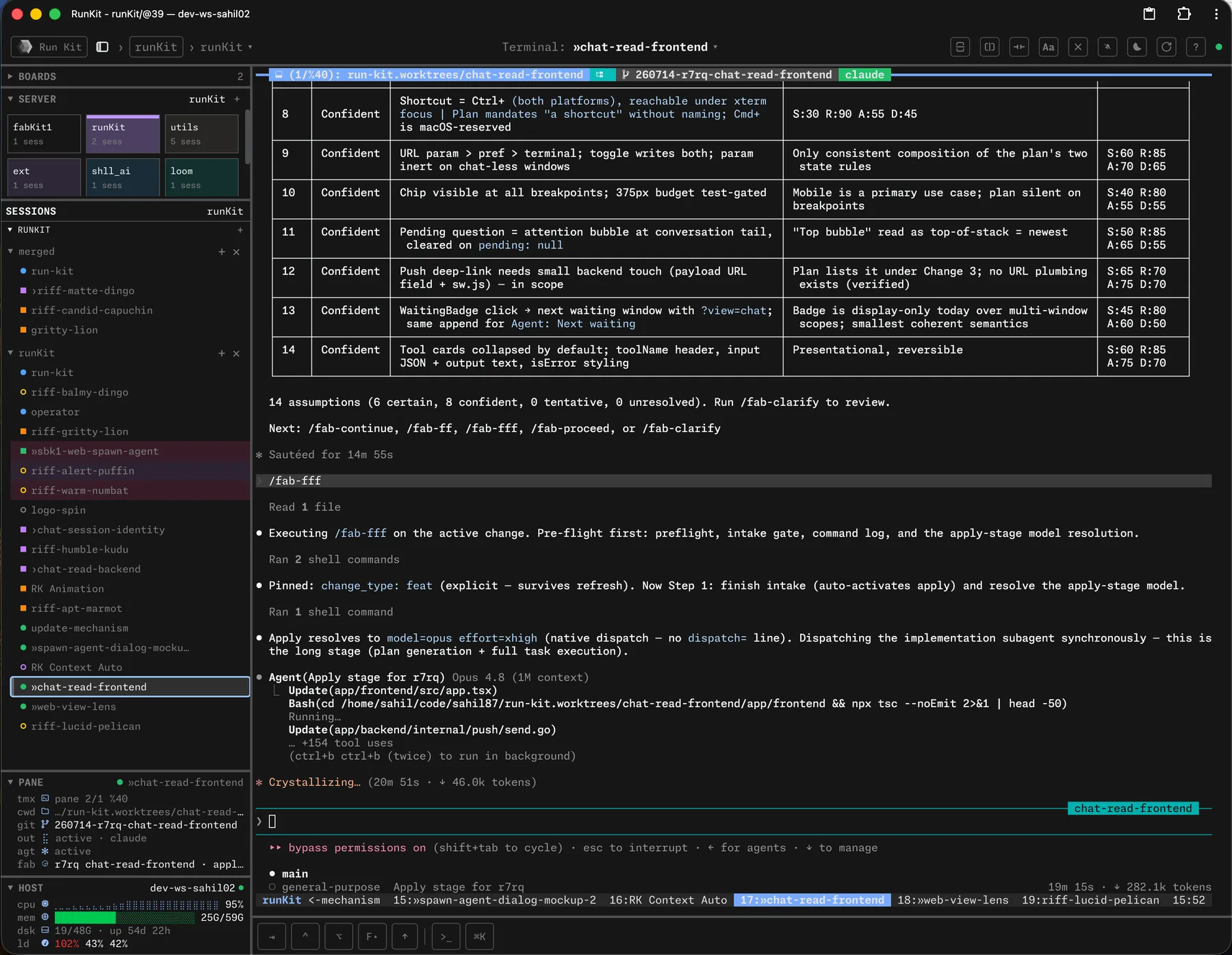
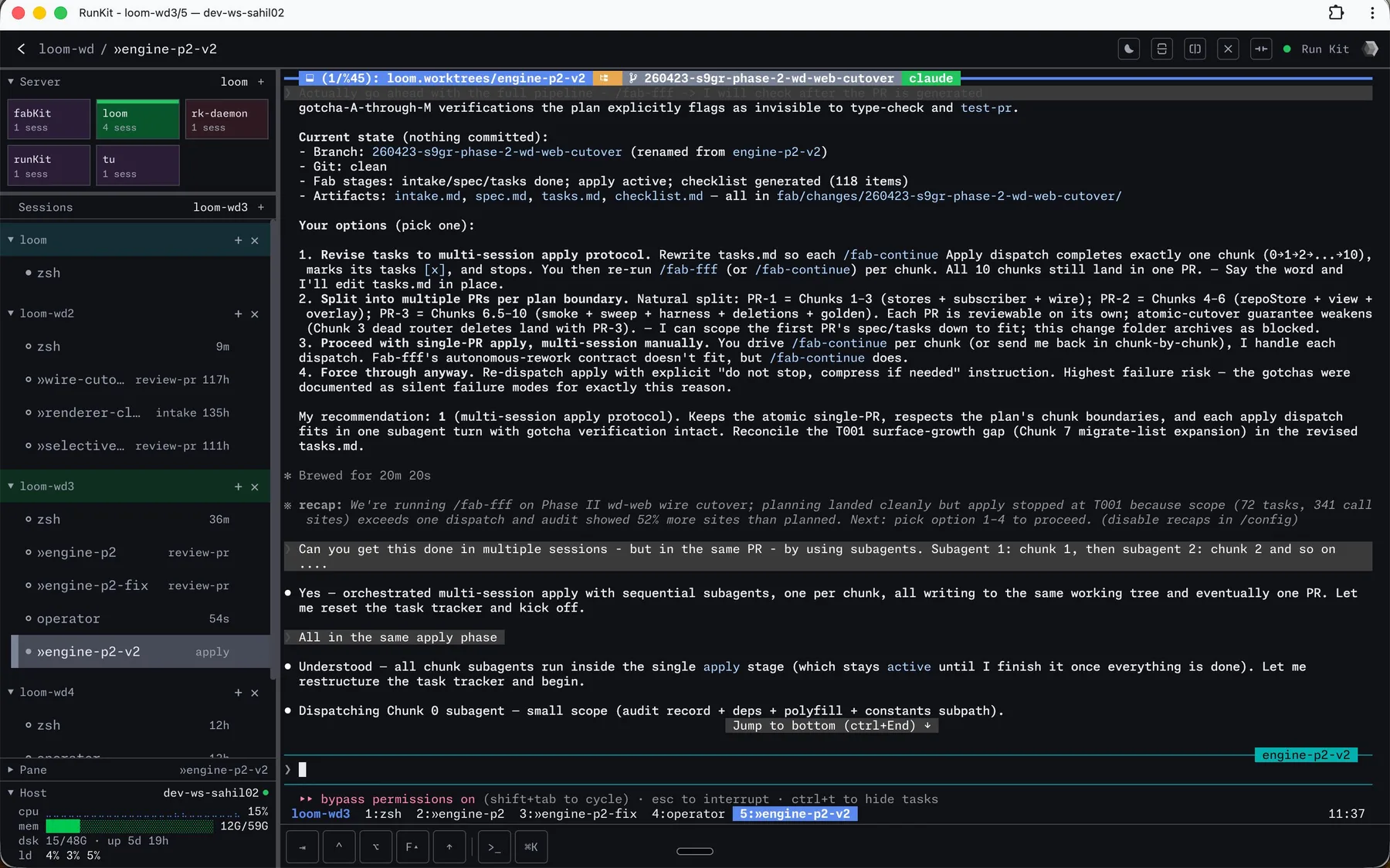
## How it fits
HexoKit is the window onto everything else: it watches the agent sessions running in your **[wt](https://hexokit.com/wt/)** worktrees, so a whole fan-out of parallel changes lives on one screen. Pair it with **[tu](https://hexokit.com/tu/)** to keep the running cost of those sessions in view.
## Where to next
- **[Readme](https://hexokit.com/docs/readme/)** — the full canonical guide, synced from the product's own repo.
- **[Commands](https://hexokit.com/docs/commands/)** — every subcommand and flag.
### fab-kit
`fab-kit` is a planning harness for AI coding agents — a 6-stage pipeline (intake → apply → review → hydrate → ship → review-PR) that forces an agent to plan before it writes code, plus standalone CLI tools and batch orchestration for running multiple agents in parallel. The whole workflow is plain Markdown prompts and checked-in artifacts — no SDK, no vendor lock-in, nothing hidden from `git`. It's for developers who've watched an agent code straight from a one-line prompt and want a constitution and a plan in place first.
## Install
## How it fits
`fab-kit` is the engine of the loop: it turns an **[idea](https://hexokit.com/idea/)** backlog item into a planned change (via `/fab-new`), runs that change inside a disposable **[wt](https://hexokit.com/wt/)** worktree, and you watch every agent session from the **[HexoKit](https://hexokit.com/docs/)** dashboard.
## Where to next
- **[Readme](https://hexokit.com/fab-kit/readme/)** — the full canonical guide, synced from fab-kit's own repo.
- **[Commands](https://hexokit.com/fab-kit/commands/)** — every subcommand and flag.
### hop
`hop` turns one `hop.yaml` config into a personal directory of all your git repos — fuzzy-navigate to any of them, clone the ones you're missing, and run a command (or batch-update) across the whole set from anywhere on your machine. For developers juggling many repositories at once, `hop` replaces a tangle of `cd` and `git` commands with one map of everywhere you work.
## Install
Two more commands finish the setup — hop's headline job (cd-ing your shell) needs the shell shim, and its config is built from your existing clones:
```sh
shll shell-setup # wire the shell shim, then open a fresh terminal
hop add -r ~/code # walk your code dir, build hop.yaml from git remotes
```
The **[install guide](https://hexokit.com/hop/install/)** walks through every step, from-source installs included.
## How it fits
`hop` is the cross-cutting navigator: it gets you into any repo fast, where you can capture a backlog item with **[idea](https://hexokit.com/idea/)** or spin up an isolated **[wt](https://hexokit.com/wt/)** worktree to start a change. It's the layer above individual repos.
## Where to next
- **[Readme](https://hexokit.com/hop/readme/)** — the full canonical guide, synced from hop's own repo.
- **[Commands](https://hexokit.com/hop/commands/)** — every subcommand and flag.
### idea
`idea` is a plain-Markdown backlog tracker for AI-assisted development — it captures and manages a per-repo backlog in a single `fab/backlog.md` file, worktree-aware and queryable from the CLI. It's the same file `fab-kit`'s `/fab-new` reads to start a change, so a captured idea flows straight into the planning pipeline. If you run multiple coding agents in parallel, `idea` is where work waits its turn — no app to open, no database to query, just a file you can `cat`, `grep`, and `git diff`.
## Install
## How it fits
`idea` feeds the pipeline: a backlog item becomes a change in **[fab-kit](https://hexokit.com/fab-kit/)** via `/fab-new`, which runs inside an isolated **[wt](https://hexokit.com/wt/)** worktree. Watch what the whole run costs with **[tu](https://hexokit.com/tu/)**.
## Where to next
- **[Readme](https://hexokit.com/idea/readme/)** — the full canonical guide, synced from idea's own repo.
- **[Commands](https://hexokit.com/idea/commands/)** — every subcommand and flag.
### shll
`shll` is the meta-CLI that bootstraps the whole AI coding toolkit — one command to install, update, and shell-wire every tool at once. It composes the per-tool CLIs rather than replacing them: `shll install` brings down each binary, and `shll update` keeps them current. It's the first thing you run and the one command you keep around to keep everything in sync.
## Install
## How it fits
`shll` is the bootstrap for everything else — see [Install everything](https://hexokit.com/toolkit/install/) to set up the toolkit in one go. From there the loop runs: **[idea](https://hexokit.com/idea/)** captures work, **[fab-kit](https://hexokit.com/fab-kit/)** plans it, **[wt](https://hexokit.com/wt/)** isolates it, and **[HexoKit](https://hexokit.com/docs/)** watches it.
## Where to next
- **[Readme](https://hexokit.com/shll/readme/)** — the full canonical guide, synced from shll's own repo.
- **[Commands](https://hexokit.com/shll/commands/)** — every subcommand and flag.
### tu
`tu` is a token and cost tracker for AI coding sessions — it tells you what Claude Code, Codex, and OpenCode are actually costing you, across every tool and every machine you work on. It syncs usage between machines and has a live watch mode for keeping the running total in a side pane while you work. If you're spending real money on coding agents, `tu` is how you see where it goes.
## Install
## How it fits
`tu` is the cost overlay on the whole loop: run it alongside a **[fab-kit](https://hexokit.com/fab-kit/)** pipeline to watch what a change costs end-to-end, or keep it in view next to the **[HexoKit](https://hexokit.com/docs/)** dashboard while a fan-out of agents runs.
## Where to next
- **[Readme](https://hexokit.com/tu/readme/)** — the full canonical guide, synced from tu's own repo.
- **[Commands](https://hexokit.com/tu/commands/)** — every subcommand and flag.
### wt
`wt` is an opinionated git worktree wrapper built for parallel AI coding — one worktree per change, one agent session per worktree, zero merge conflicts between them. It wraps `git worktree` with defaults that make the pattern effortless: worktrees are sibling directories (`.worktrees//`), names are memorable adjective-noun pairs, and a shell wrapper makes `cd`-into-worktree from a menu work. If you're running several coding agents at once, `wt` is what keeps each one in its own isolated working copy.
## Install
## How it fits
`wt` is where the work happens: each **[fab-kit](https://hexokit.com/fab-kit/)** change gets its own disposable worktree, so parallel agents never collide. Watch every worktree's session at a glance in the **[HexoKit](https://hexokit.com/docs/)** dashboard.
## Where to next
- **[Readme](https://hexokit.com/wt/readme/)** — the full canonical guide, synced from wt's own repo.
- **[Commands](https://hexokit.com/wt/commands/)** — every subcommand and flag.